Stylish Art Brushes: A Practical Evaluation for Adobe Illustrator
In the realm of digital illustration, the gap between vector precision and organic texture has long been a challenge for designers. While Adobe Illustrator is renowned for its clean lines and scalable graphics, achieving a hand-drawn, imperfect aesthetic often requires complex workarounds or external software. This is where specialized brush sets, such as Stylish Art Brushes, enter the workflow. These tools are designed to introduce messy, inky, rough, textured, and glitchy elements directly into vector environments, offering a bridge between digital efficiency and analog character.
For designers evaluating whether to integrate these exclusive brushes into their toolkit, it is essential to look beyond the visual appeal and assess their functional utility, customization capabilities, and compatibility with existing workflows. This article explores the practical applications of these brushes, helping you determine if they align with your project goals.
Understanding the Aesthetic and Functionality
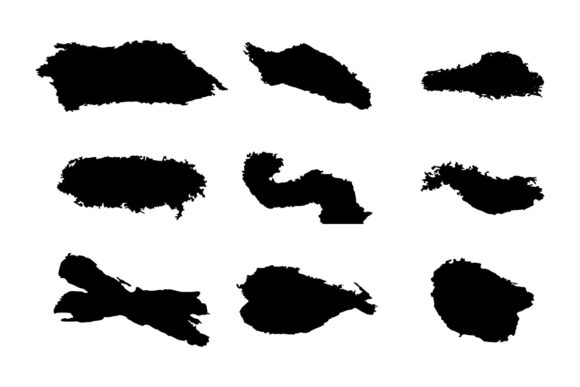
Stylish Art Brushes are not merely decorative stamps; they are dynamic vector paths engineered to mimic the unpredictability of traditional media. The collection focuses on five distinct textural qualities: messy, inky, rough, textured, and glitchy. Each category serves a specific design purpose, allowing artists to break away from the sterile perfection often associated with vector art.
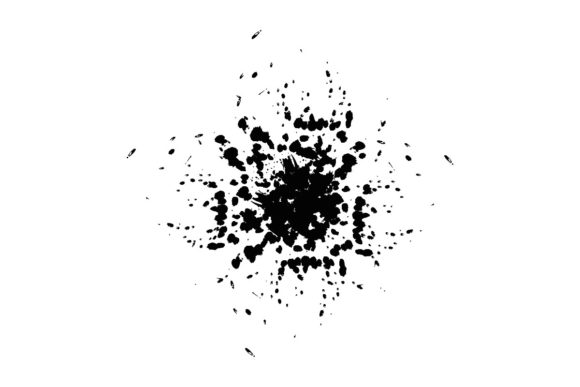
The "messy" and "inky" variants replicate the bleed and splatter of ink on paper, providing a sense of movement and spontaneity. The "rough" and "textured" brushes introduce grain and irregularity, simulating the feel of charcoal, chalk, or dry brush strokes. Meanwhile, the "glitchy" options offer a modern, digital-distortion aesthetic that is increasingly popular in contemporary graphic design. By combining these varied and unique brushes, users can create complex compositions that feel hand-crafted while retaining the scalability of vector files.
Key Features and Technical Considerations
When evaluating any digital asset, technical compatibility and ease of use are paramount. The Stylish Art Brushes package is structured to accommodate professional workflows within Adobe Illustrator. Below are the core features that define its utility:
- Easy Customization: One of the most significant advantages of this set is its editability. Unlike raster-based textures that lose quality when scaled or colored, these brushes are fully vector-based. Users can easily change colors to match brand guidelines or project palettes without compromising the integrity of the texture.
- Adobe Illustrator CC Compatibility: The files are optimized for Adobe Illustrator CC, ensuring smooth integration with current software versions. This reduces the risk of compatibility errors or missing features during installation and use.
- Included File Formats: The package includes SVG and EPS files. SVG (Scalable Vector Graphics) is ideal for web-based projects and modern design workflows, while EPS (Encapsulated PostScript) remains a standard for print production and older software compatibility. This dual-format approach ensures versatility across different media types.
Benefits of Integrating Textured Vector Brushes
For designers accustomed to working strictly within the vector environment, adopting Stylish Art Brushes offers several tangible benefits. The primary advantage is workflow efficiency. Traditionally, adding texture to vector art required exporting files to Photoshop, applying raster textures, and then re-importing them—a process that breaks the non-destructive editing chain. With these brushes, texture application happens natively within Illustrator, allowing for real-time adjustments.
Furthermore, the ability to edit and combine brushes provides a high degree of creative control. Designers can layer a "rough" brush over an "inky" base to create depth, or adjust the opacity and blending modes to achieve subtle effects. This flexibility is crucial for projects requiring a unique visual identity, such as branding for artisanal products, editorial illustrations, or album artwork.
Tradeoffs and Limitations
While the benefits are clear, it is important to acknowledge the tradeoffs. Vector brushes, by nature, consist of numerous anchor points to simulate irregular edges. Complex textures like "messy" or "glitchy" brushes can significantly increase file size and processing load. For users working on older hardware or managing large-scale documents with hundreds of elements, this may result in slower performance.
Additionally, while these brushes emulate organic media, they are still mathematical constructs. Purists who seek the true randomness of physical paint or ink may find the repetition in vector patterns limiting. However, for most commercial applications, the level of realism provided is sufficient, especially when combined with manual adjustments.
Ideal Use Cases
Determining whether Stylish Art Brushes are a strong fit depends largely on the nature of your projects. These tools are particularly effective in the following scenarios:
- Brand Identity for Lifestyle Brands: Companies in the food, beverage, or fashion industries often seek a handcrafted, authentic look. These brushes can add warmth and personality to logos and packaging designs without sacrificing the scalability needed for various print sizes.
- Editorial and Publication Design: Magazines and blogs frequently require illustrations that complement textual content. The "inky" and "rough" styles provide a sophisticated, artistic backdrop that enhances readability and visual interest.
- Digital Art and Social Media Graphics: The "glitchy" and "textured" options are well-suited for modern digital campaigns, where standing out in a crowded feed requires bold, unconventional visuals.
When to Consider Alternatives
Despite their versatility, there are situations where alternative tools may be more appropriate. If your primary focus is photorealistic rendering or complex photo manipulation, raster-based software like Adobe Photoshop or Procreate may offer superior control over light, shadow, and texture. Similarly, if you are working on technical illustrations, architectural diagrams, or data visualizations where precision and clarity are paramount, the organic irregularity of these brushes may detract from the message.
Moreover, designers who prefer a completely non-destructive workflow might consider using texture overlays or pattern fills instead of brush strokes. While less flexible in terms of shape manipulation, overlays can sometimes offer a lighter performance footprint.
Making the Decision
Choosing to incorporate Stylish Art Brushes into your workflow should be a strategic decision based on your design needs. If you frequently find yourself trying to soften the rigidness of vector art or seeking ways to add character without leaving Illustrator, this toolset offers a practical solution. The inclusion of SVG and EPS formats ensures that you are prepared for both digital and print outputs, while the editable nature of the brushes allows for long-term adaptability.
However, if your work demands extreme minimalism or if you are constrained by hardware limitations, it may be wise to test the brushes with a trial project first. Evaluate how your system handles the complexity of the paths and whether the aesthetic aligns with your client's expectations. By balancing the desire for organic texture with the technical realities of vector design, you can make an informed choice that enhances your creative output.
Ultimately, Stylish Art Brushes represent a valuable resource for designers looking to expand their visual vocabulary. They provide a means to inject humanity and imperfection into digital work, reminding viewers that behind every pixel, there is an artist's hand. Whether you are creating a bold poster, a subtle background, or a complex illustration, these brushes offer the tools necessary to achieve a distinctive and professional result.