Mastering Rhythmic Design: A Practical Guide to Oscillation Waves Illustrator Brushes
In the realm of digital illustration, particularly within HiTech, futuristic, and scientific genres, precision and rhythm are paramount. Designers often face the tedious task of manually constructing complex waveforms, audio impulses, and sinusoidal patterns. This is where specialized tools like Oscillation Waves Illustrator Brushes become invaluable. These vector-based assets are not merely decorative; they are functional instruments that allow artists to generate endless ribbons, friezes, and edging with mathematical consistency. By leveraging these brushes, creators can significantly reduce production time while maintaining a high standard of aesthetic coherence in their technical illustrations.
Understanding the Core Functionality
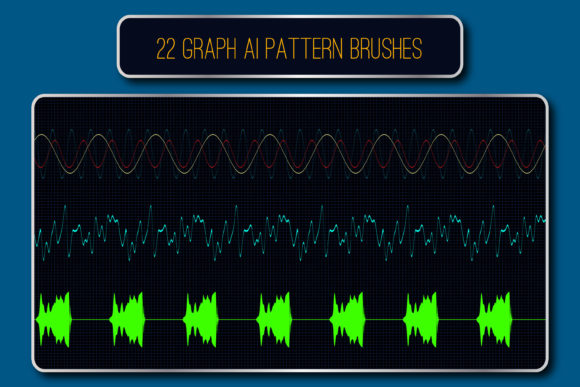
At its essence, this collection comprises 22 pattern vector brushes designed specifically to replicate the visual language of oscillation. Unlike standard raster brushes that may lose quality when scaled, these are vector-based, ensuring crisp lines regardless of size. The set includes variations that mimic hesitations, audio impulses, and rhythmic sinusoids. This diversity allows for a nuanced approach to decoration, enabling users to convey movement, frequency, and energy without drawing each curve by hand.
A distinct feature of this toolkit is the inclusion of five brushes with dedicated corner elements. In vector design, creating seamless corners for continuous wave patterns is notoriously difficult. Standard brushes often break or overlap awkwardly at angles. The inclusion of pre-built corner elements solves this structural problem, allowing for the creation of closed shapes, frames, and complex geometric borders that maintain visual continuity. This attention to structural detail sets these brushes apart from generic waveform packs that only offer linear strokes.
Evaluating Compatibility and Workflow Integration
When evaluating any digital asset, compatibility with existing software versions is a critical decision factor. These Oscillation Waves Illustrator Brushes are compatible with Adobe Illustrator CS5 and later, but they also include original AI (Illustrator 10) and EPS 10 files. This backward compatibility is a significant advantage for professionals working in environments with mixed software versions or those who prefer the stability of older file formats. It ensures that the brushes can be integrated into legacy projects without requiring a complete software overhaul.
The package size is remarkably efficient, with the ZIP archive totaling only 1.22 MB. For designers managing large libraries of assets, lightweight resources are preferable as they do not burden system storage or slow down project loading times. Furthermore, the inclusion of a PDF help file with screenshots provides immediate guidance on installation and usage. This documentation is crucial for users who may be unfamiliar with the specific mechanics of pattern brushes in Illustrator, reducing the learning curve and facilitating quicker adoption into daily workflows.
Comparing Vector Brushes to Manual Creation and Alternatives
To understand the value proposition of these brushes, it is helpful to compare them against alternative methods of creating similar effects. The primary alternative is manual creation using the Pen Tool or the Spiral Tool in Illustrator. While manual drawing offers ultimate control, it is time-consuming and requires a high degree of skill to achieve consistent amplitude and frequency across long paths. For projects requiring extensive background patterns or complex data visualization aesthetics, manual creation is often impractical.
Another common alternative is using raster-based texture packs. While raster images can provide quick visual results, they lack the scalability of vector graphics. When a raster wave is enlarged for a large-format print or a high-resolution screen display, it pixelates and loses clarity. In contrast, the vector nature of these oscillation brushes ensures that the lines remain sharp and editable. Users can change the color, size, or thickness of the stroke non-destructively, allowing for rapid iteration during the design process.
Compared to generative art scripts or plugins, these brushes offer a more accessible entry point. Scripts often require coding knowledge or complex installation procedures that can intimidate casual users. Brushes, by contrast, are a native feature of Illustrator. Once installed, they behave like any other standard tool, making them intuitive for designers of all skill levels. However, it is worth noting that for highly randomized, organic chaos, a generative script might offer more variation. For structured, rhythmic, and clean HiTech aesthetics, these brushes provide a more controlled and predictable outcome.
Best-Fit Use Cases and Design Applications
The versatility of Oscillation Waves Illustrator Brushes makes them suitable for a wide array of applications. They are particularly effective in:
- Scientific and Medical Illustrations: Representing sound waves, heartbeats, seismic activity, or neural signals with accuracy and clarity.
- HiTech and Cyberpunk Interfaces: Creating futuristic UI elements, holographic displays, and data stream backgrounds that require a clean, digital aesthetic.
- Music and Audio Branding: Designing album covers, concert posters, or visualizers that need to reflect rhythm and frequency.
- Architectural and Interior Decor: Generating modern friezes, border patterns, and wall decals that utilize repetitive geometric forms.
In each of these scenarios, the ability to quickly adjust the thickness and color of the waves allows the designer to match the brand identity or thematic requirements precisely. For instance, a subtle, thin sine wave might serve as an elegant background texture for a corporate tech report, while a bold, thick audio impulse could dominate a music festival poster.
Limitations and Considerations
While these brushes are powerful, they are not a universal solution for all wave-related design needs. Users should be aware of certain limitations. First, because they are pattern brushes, they rely on repetition. If a design requires a unique, non-repeating wave form that changes character significantly over its length, a standard brush may not suffice without extensive customization. In such cases, combining multiple brushes or editing the underlying vector paths may be necessary.
Additionally, while the corner elements are a strong feature, they are limited to the five provided styles. If a project requires a specific angle or corner radius not covered by these presets, the designer will need to manually adjust the vector anchors or create custom corner tiles. This requires a intermediate understanding of how pattern brushes are constructed in Illustrator. However, the inclusion of the original AI and EPS files means that advanced users can dissect and modify the existing brushes to create their own variations, extending the utility of the pack beyond its out-of-the-box capabilities.
Making the Right Choice for Your Project
Deciding whether to incorporate Oscillation Waves Illustrator Brushes into your toolkit depends on your specific workflow and project demands. If you frequently work in styles that require clean, repetitive, and scalable linear patterns, these brushes offer a high return on investment in terms of time saved. They are ideal for designers who value efficiency and consistency.
However, if your work leans heavily towards organic, hand-drawn, or irregular textures, these structured vectors may feel too rigid. In such cases, exploring textured raster brushes or custom hand-drawn assets might yield better results. It is also important to consider your comfort level with vector editing. While the brushes are easy to apply, maximizing their potential—especially when modifying corner elements or creating new variations—requires a solid grasp of Adobe Illustrator’s brush engine.
Ultimately, these brushes serve as a robust foundation for HiTech and scientific design. They bridge the gap between complex mathematical precision and artistic expression, allowing designers to focus on composition and concept rather than the minutiae of path construction. By providing a reliable, scalable, and editable resource, they empower creators to produce professional-grade illustrations with greater speed and confidence.
For those interested in expanding their digital asset library, evaluating this tool against your current needs is a prudent step. Consider the frequency with which you employ wave motifs and the importance of vector scalability in your output. If these factors align with your professional requirements, integrating these oscillation brushes can streamline your creative process and enhance the visual impact of your technical and futuristic designs.