Evaluating Leaf and Flower Brushes for Adobe Illustrator
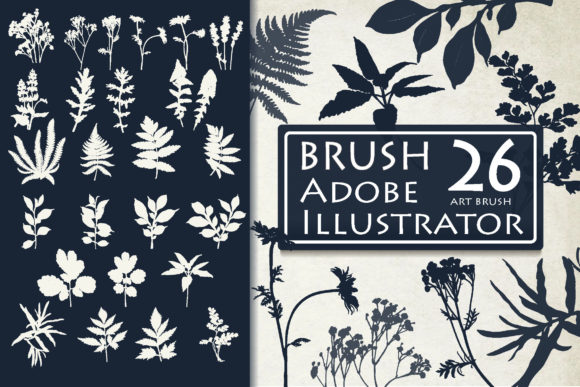
In the realm of digital graphic design, efficiency and aesthetic versatility are paramount. Designers frequently seek tools that bridge the gap between complex manual illustration and rapid asset deployment. Leaf and Flower Brushes for Ai represent a specialized resource aimed at streamlining the creation of botanical elements within Adobe Illustrator. This collection comprises 26 flexible, adjustable silhouette brushes designed to enhance a variety of creative projects, from corporate branding to personal artistic endeavors. Understanding the functionality, compatibility, and practical applications of these brushes is essential for designers determining whether this toolset aligns with their workflow and project requirements.
Understanding the Toolset
At its core, this product is a library of vector-based art brushes compatible with Adobe Illustrator. Unlike standard raster images, which lose quality when scaled, these brushes are built on vector paths. This means they can be resized infinitely without pixelation or loss of clarity. The collection includes 26 distinct silhouettes of leaves and flowers, offering a range of organic shapes that mimic natural forms. These are not static stamps; they are dynamic brushes that respond to the path drawn by the user. When a designer draws a line or curve using the Pen Tool or Brush Tool, the selected leaf or flower silhouette adheres to that path, creating an instant arrangement that can be further manipulated.
The technical foundation of these brushes ensures they remain editable. Because they are native to Adobe Illustrator, every element generated by the brush retains its vector properties. Users can adjust the size, shape, and orientation of the botanical elements after application. This level of control is crucial for professional design work, where precise alignment and customization are often required to meet specific client briefs or brand guidelines.
Key Benefits and Functional Advantages
The primary advantage of utilizing Leaf and Flower Brushes for Ai lies in the significant reduction of production time. Creating realistic or stylized floral arrangements from scratch requires a high degree of illustrative skill and considerable time investment. By using pre-designed silhouette brushes, designers can achieve complex visual results with minimal effort. The ability to draw a simple path and instantly generate a detailed floral pattern allows for rapid prototyping and iteration. This is particularly beneficial in commercial environments where turnaround times are tight.
Another significant benefit is the flexibility of the assets. Since the brushes are adjustable, they are not limited to a single use case. A designer can create a delicate, thin vine for a wedding invitation or a bold, thick cluster of leaves for a poster header simply by altering the stroke weight and path dimensions. This adaptability makes the collection a versatile addition to a designer’s toolbox, suitable for a wide array of mediums including invitations, business cards, pillow covers, book jackets, illustrations, posters, prints, T-shirts, social media graphics, and logos.
Furthermore, the inclusion of an EPS10 vector file alongside the brush library adds value for users who may need individual static elements. While the brushes are ideal for generating patterns and flowing designs, the EPS file provides access to standalone leaf and flower images. This dual-format approach ensures that users have both dynamic tools for creation and static assets for direct placement, enhancing the overall utility of the purchase.
Compatibility and Technical Considerations
Before integrating these brushes into a workflow, it is critical to understand the software requirements. The Leaf and Flower Brushes for Ai are explicitly designed for Adobe Illustrator. They are saved in formats compatible with Adobe Illustrator CC and Adobe Illustrator 10, ensuring broad backward compatibility. The brushes are contained within an .ai file, which can be loaded directly into the Illustrator Brushes panel. It is important to note that these brushes are not compatible with Adobe Photoshop or other raster-based editing software. Attempting to use them in non-vector environments will result in incompatibility issues, as the underlying technology relies on vector path data.
Designers working in older versions of Illustrator should verify their software version against the provided files. While the inclusion of Illustrator 10 compatibility suggests broad support, users on very legacy systems may experience minor discrepancies in how certain brush dynamics are rendered. However, for the vast majority of modern users, the integration process is straightforward: open the provided .ai file, select the desired brushes, and add them to the library for immediate use.
Ideal Use Cases
This collection is particularly well-suited for projects that require organic, naturalistic accents without the overhead of custom illustration. For example, event stationery designers can quickly generate elegant floral borders for wedding invitations or birthday cards. Brand identity specialists might use these silhouettes to create subtle background textures for business cards or packaging designs, adding a touch of nature-inspired elegance without overwhelming the primary logo or message.
In the context of apparel design, such as T-shirts or tote bags, the scalability of vector brushes is a major asset. Designs can be scaled up for large prints or down for small labels without any loss in quality. Social media managers and content creators can also benefit by using these brushes to create consistent, branded floral frames or dividers for posts and stories, maintaining a cohesive visual identity across platforms.
Limitations and Alternatives
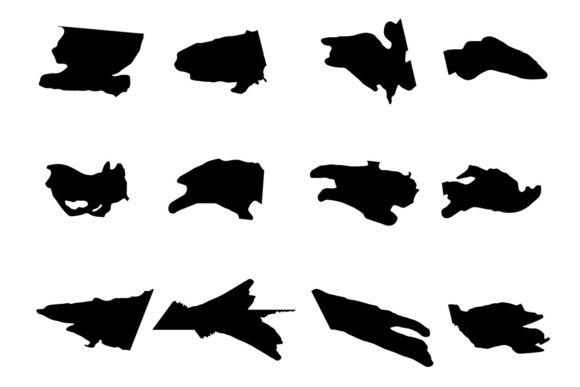
While Leaf and Flower Brushes for Ai offer significant convenience, they are not a universal solution for all botanical design needs. One limitation is the stylistic constraint: the collection offers 26 specific silhouettes. If a project requires a highly specific species of flower or a unique artistic style not represented in the set, designers may still need to commission custom illustrations or source additional assets. Additionally, because these are silhouette brushes, they lack internal detail such as shading, gradients, or texture. They are best used for flat, graphic styles rather than photorealistic renderings.
For designers seeking photorealistic botanical elements, raster-based photo stocks or detailed 3D models may be more appropriate. Similarly, if a designer prefers working exclusively in Photoshop or Procreate, they should look for brush sets specifically optimized for those platforms, as converting vector brushes to raster formats can be cumbersome and may negate the benefits of scalability.
Making the Decision
Deciding whether to incorporate Leaf and Flower Brushes for Ai into your toolkit depends on your typical project types and software proficiency. If you frequently work in Adobe Illustrator and find yourself repeatedly drawing similar floral elements, this collection can significantly enhance your efficiency. It is an excellent investment for graphic designers, illustrators, and hobbyists who value speed and consistency in their workflow.
However, if your work primarily involves photorealistic imagery or if you do not use Adobe Illustrator, this product may not meet your needs. It is also worth considering whether the existing 26 variations provide enough diversity for your long-term projects. For many, the combination of adjustable vector brushes and the included EPS file offers a robust balance of flexibility and convenience, making it a practical addition to a comprehensive design resource library.
Ultimately, these brushes serve as a powerful aid for decorating a variety of projects with natural design elements. By understanding their capabilities and limitations, designers can make informed decisions that align with their creative goals and technical requirements. For those interested in exploring this resource further, contacting the store provider can clarify any specific questions regarding file formats or usage rights.