Wild Weeds Eco Illustrator Brushes: A Practical Evaluation for Natural Design Workflows
In the realm of digital illustration and graphic design, achieving an authentic organic aesthetic often requires more than standard geometric shapes or stock photography. Designers seeking to infuse their projects with a natural, eco-friendly vibe frequently turn to specialized tools that mimic the irregularity and texture of the natural world. Wild Weeds Eco Illustrator Brushes represent one such solution, offering a collection of vector-based assets designed specifically for Adobe Illustrator. This evaluation explores the functionality, utility, and practical considerations of this brush set, helping designers determine if it aligns with their specific project requirements.
Understanding the Toolset
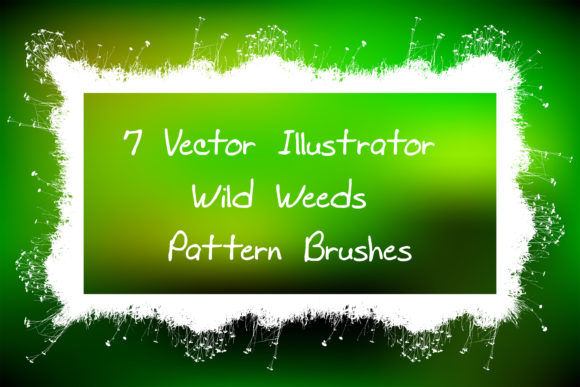
At its core, this product is a collection of seven pattern brushes tailored for creating seamless natural borders, frames, and decorative edging. Unlike raster images, which can lose quality when scaled, these brushes are built on vector technology. This means they remain crisp and editable regardless of the size to which they are applied. The primary focus is on wild grasses and weeds, elements that are notoriously difficult to draw manually due to their complex, chaotic structures. By converting these intricate forms into reusable brushes, the toolset aims to streamline the workflow for designers working on nature-themed compositions.
The package includes original files compatible with Adobe Illustrator CC, as well as CS versions and EPS 8 formats. This broad compatibility is a significant technical consideration, ensuring that users with older software versions are not excluded. Furthermore, the inclusion of a PDF help file with screenshots provides necessary guidance for installation and usage, reducing the learning curve for those unfamiliar with creating or modifying pattern brushes.
Key Benefits and Functional Advantages
The primary advantage of using Wild Weeds Eco Illustrator Brushes lies in efficiency and flexibility. Creating realistic weed and grass formations from scratch is time-consuming. These brushes allow users generate endless plant ribbons, friezes, and edging with minimal effort. Once applied to a path, the brush tiles the pattern seamlessly, allowing for rapid creation of complex borders.
- Scalability and Editability: Because the brushes are vector-based, users can change the color, size, or thickness of the strokes without any loss in resolution. This is crucial for designs that need to be adapted for various mediums, from small business cards to large-format banners.
- Natural Aesthetic: The brushes capture the erratic, organic flow of wild vegetation, providing a level of realism that is difficult to achieve with manual drawing unless one possesses advanced illustration skills.
- Customization Potential: The inclusion of original AI and EPS files means that advanced users are not locked into the preset designs. If a specific leaf shape or stem curvature does not fit a project, the underlying vectors can be modified to create custom variations.
Practical Applications and Ideal Use Cases
This toolset is particularly well-suited for projects that demand a rustic, botanical, or eco-conscious visual language. Designers working on packaging for organic products, such as herbal teas, natural cosmetics, or artisanal foods, will find these brushes invaluable for creating frame elements that reinforce brand identity. Similarly, wedding invitations, stationery, and greeting cards often benefit from delicate, hand-drawn floral borders that these brushes can simulate effectively.
Another strong fit is in the creation of digital backgrounds and textures for web design or social media content. The ability to create endless ribbons allows for the construction of unique headers and footers that break away from rigid, corporate grid structures. For illustrators working on children’s books or educational materials about nature, these brushes can serve as quick underlayers or decorative accents that enhance the thematic consistency of the artwork.
Considerations and Tradeoffs
While the benefits are clear, there are tradeoffs and limitations that potential users should consider. First, the nature of pattern brushes means that they repeat along a path. If not managed carefully, this repetition can become visually obvious, breaking the illusion of randomness. Users must spend time adjusting the scale and spacing of the brush strokes to ensure the pattern looks natural rather than mechanical. This requires a keen eye for detail and some experimentation within Illustrator.
Additionally, while the brushes are compatible with a wide range of Illustrator versions, users of very recent software updates may occasionally encounter minor dialog warnings when opening older EPS files. Although these are typically non-destructive, they can be unsettling for inexperienced users. The 36.2 MB ZIP archive size is reasonable, but it does contain multiple file formats. Users need to be organized in their file management to avoid cluttering their workspace with unused legacy files.
It is also important to note that these brushes are two-dimensional vector representations. They do not provide the depth, shading, or photographic realism of high-resolution raster photos. For projects requiring photorealism, these brushes may appear too stylized or flat. They are best used in conjunction with other design elements that complement their illustrative style.
Evaluating Alternatives
When deciding whether to invest in Wild Weeds Eco Illustrator Brushes, it is wise to compare them against alternatives. One alternative is manual illustration. For highly skilled artists, drawing custom weeds offers complete creative control and uniqueness. However, this approach is significantly slower and may not be feasible for tight deadlines or commercial projects requiring consistent, repeatable elements.
Another alternative is using stock raster images of grass and weeds. While these offer photographic realism, they lack the scalability of vectors. Resizing a raster image often results in pixelation, and integrating them into a vector workflow can complicate the file structure. Furthermore, editing the color of a photograph to match a specific brand palette is far more complex than changing the stroke color of a vector brush.
Generic vector brush packs are also available. However, many general-purpose packs lack the specific ecological accuracy and stylistic nuance of a specialized set like Wild Weeds. If a project specifically calls for an "eco" or "wild" aesthetic, a generic floral brush may look too cultivated or manicured, failing to convey the intended rugged naturalism.
Decision-Making Insights
To determine if this toolset is the right choice, consider your current workflow and project types. If you frequently design materials that require natural borders or frames, and you work primarily in Adobe Illustrator, this product offers a high return on investment in terms of time saved. The ability to tweak colors and sizes instantly allows for rapid prototyping and client revisions.
However, if your work is predominantly photographic or if you rarely use pattern brushes, the utility may be limited. Additionally, if you require absolute uniqueness in every element and have the time to illustrate from scratch, pre-made brushes might feel restrictive. For most intermediate to advanced Illustrator users, though, the balance of convenience and customization makes this a practical addition to their asset library.
In conclusion, Wild Weeds Eco Illustrator Brushes provide a specialized, efficient solution for creating naturalistic vector designs. They bridge the gap between the time-consuming process of manual illustration and the rigidity of stock photography. By understanding their strengths in scalability and customization, as well as their limitations regarding repetition and stylistic scope, designers can make an informed decision about integrating them into their creative toolkit. For those committed to an eco-friendly, organic design aesthetic, these brushes offer a reliable and versatile resource.