Trunk of Bamboo - 20 Illustrator Brushes: A Practical Review for Designers
In the realm of digital illustration, texture and organic detail often separate amateur work from professional-grade design. For designers working within Adobe Illustrator, creating realistic natural elements like bamboo can be time-consuming if done manually. This is where specialized brush sets become invaluable assets. The Trunk of Bamboo - 20 Illustrator Brushes package offers a curated collection of vector-based tools designed to streamline the creation of eastern, southern, and tropical-themed artwork. By providing pre-configured pattern brushes, this resource allows users to generate complex bamboo structures, frames, and decorative borders with minimal effort.
However, integrating any third-party asset into a professional workflow requires careful evaluation. Designers must consider compatibility, versatility, and how these specific brushes compare to creating custom vectors or using raster-based alternatives. This article explores the features, practical applications, and strategic fit of the Trunk of Bamboo brush set, helping you determine if it aligns with your current project needs.
Understanding the Core Features and Compatibility
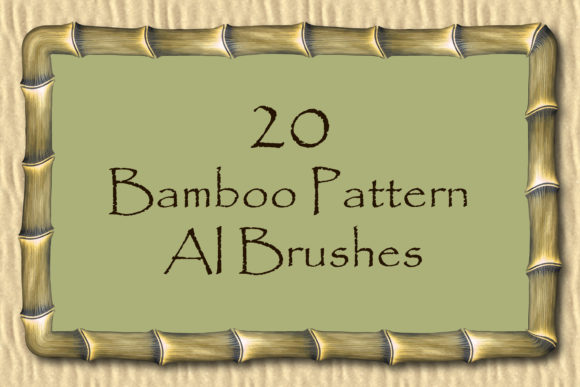
The primary value proposition of the Trunk of Bamboo - 20 Illustrator Brushes lies in its efficiency. The package includes twenty distinct pattern vector brushes, each engineered to replicate the segmented, cylindrical nature of bamboo cane. Unlike standard stroke brushes that simply apply a texture along a path, pattern brushes in Illustrator tile a defined graphic along the length of a stroke. This distinction is crucial for maintaining the structural integrity of bamboo segments, ensuring that nodes and internodes appear consistent regardless of the line’s length or curvature.
From a technical standpoint, compatibility is a significant factor for many professionals. This set is compatible with Illustrator CS5 and includes original AI (Illustrator 10) and EPS 10 files. While modern Creative Cloud versions are backward compatible, having access to older file formats ensures that users on legacy systems can still utilize the assets without conversion errors. Furthermore, the inclusion of a PDF help file with screenshots provides essential guidance for installation and usage, reducing the learning curve for those less familiar with managing custom brush libraries.
The file size of the ZIP archive is approximately 20.5 MB. In an era where some asset libraries can reach gigabytes in size, this lightweight footprint is advantageous. It suggests that the brushes are optimized vector paths rather than heavy, embedded raster images, which contributes to faster performance within the Illustrator environment.
Design Versatility: From Frames to Friezes
One of the most compelling aspects of this brush set is its adaptability across different design contexts. The ability to easily create endless ribbons, friezes, and edging makes it particularly useful for packaging design, invitation suites, and web banners. Because the brushes are vector-based, they scale infinitely without loss of quality. This means a designer can create a delicate border for a business card or a massive backdrop for a trade show display using the same asset.
Beyond simple lines, the brushes facilitate the creation of complex structures such as bamboo cadres and frames. In interior design mockups or architectural illustrations, these frames can serve as realistic dividers or window elements. The tropical and eastern aesthetic is not limited to traditional Asian art; it also fits well within modern bohemian, eco-friendly, and sustainable branding themes. By adjusting the color, size, or thickness of the stroke, users can shift the mood from a dark, moody jungle scene to a light, airy spa advertisement.
Consider a practical example: a beverage company launching a new organic tea line. Using the Trunk of Bamboo - 20 Illustrator Brushes, a designer could quickly draft a label border that mimics wrapped bamboo stalks. Instead of drawing each segment individually, the designer applies the brush to a closed path, adjusts the scale to fit the label dimensions, and modifies the color palette to match brand guidelines. This process, which might take hours manually, is reduced to minutes.
Comparing Vector Brushes to Alternative Methods
When evaluating whether to purchase a brush set like this, it is helpful to compare it against other methods of achieving similar results. The primary alternatives include manual vector drawing, raster image manipulation, and 3D modeling.
- Manual Vector Drawing: Creating bamboo manually offers the highest level of control. Each node, shadow, and highlight can be placed precisely. However, this method is labor-intensive and difficult to edit later. If a client requests a thicker stem or a different curve, the entire illustration may need to be redrawn. The Trunk of Bamboo brushes sacrifice some granular control for significant time savings and editability.
- Raster Images: Using photographic textures or PNGs of bamboo can provide photorealism. However, raster images do not scale well and can pixelate when enlarged. They also lack the clean, graphic quality often desired in logo design or print media. Vector brushes maintain crisp edges at any size, making them superior for print production.
- 3D Modeling: For hyper-realistic product renders, 3D software is the gold standard. Yet, 3D workflows are complex and require specialized skills. For 2D graphic design projects, importing 3D models is often overkill. The vector brushes offer a "good enough" realism that integrates seamlessly into standard 2D workflows.
The tradeoff with pattern brushes is that they can sometimes look repetitive if the tile length is obvious. Skilled designers mitigate this by varying the stroke width or combining multiple brush styles from the set to break up visual monotony. The Trunk of Bamboo set includes twenty variations, which helps in creating more organic, less uniform appearances.
Limitations and Considerations for Potential Users
While the Trunk of Bamboo - 20 Illustrator Brushes offer considerable benefits, they are not a universal solution. Designers should be aware of certain limitations before purchasing.
First, the aesthetic is specific. If your project requires a western, industrial, or minimalist style, these brushes may not be relevant. They are tailored for eastern, southern, and tropical themes. Using them outside this context could result in a stylistic clash.
Second, while the brushes are editable, they are not fully customizable in the sense of altering the fundamental shape of the bamboo segment without diving into the brush definition settings. Users who need highly stylized or abstract interpretations of bamboo might find the predefined patterns restrictive. In such cases, creating a custom brush from scratch might be more appropriate, although this requires advanced knowledge of Illustrator’s brush engine.
Additionally, the compatibility with Illustrator CS5 and AI 10/EPS 10 formats is a double-edged sword. While it ensures broad accessibility, it means the files may not leverage the latest features of modern Illustrator versions, such as variable width profiles or advanced gradient meshes, unless the user recreates them. However, for most standard design tasks, the existing functionality is sufficient.
Decision Factors: Is This Set Right for You?
Choosing the right design resources depends on your specific workflow and project requirements. The Trunk of Bamboo - 20 Illustrator Brushes are likely a strong fit if:
- You frequently work on projects with tropical, Asian, or eco-friendly themes.
- You need to produce high volumes of decorative elements quickly.
- You prefer vector workflows for their scalability and print readiness.
- You are comfortable with intermediate-level Illustrator tools, such as managing brush libraries and editing stroke profiles.
Conversely, you might want to explore other options if:
- You require photorealistic 3D renders.
- Your design style is strictly minimalist or geometric.
- You need complete control over every individual node and segment for artistic expression.
- You are working exclusively in raster-based software like Photoshop, although vector assets can be imported, they lose some editability.
Ultimately, the value of this tool lies in its ability to bridge the gap between artistic intent and production efficiency. By providing a robust set of twenty pattern brushes, it empowers designers to add intricate, organic details to their work without getting bogged down in repetitive manual drawing. For professionals seeking to enhance their toolkit with reliable, theme-specific assets, the Trunk of Bamboo - 20 Illustrator Brushes represent a practical and versatile addition.
Before finalizing your decision, consider downloading a preview if available, or reviewing user ratings to gauge satisfaction with the specific aesthetic quality. As with any design resource, the best choice is one that seamlessly integrates into your creative process, allowing you to focus on the broader vision of your project rather than the minutiae of execution.