Evaluating Mosses and Lichens Illustrator Brushes for Natural Design
In the realm of digital graphic design, achieving an authentic organic aesthetic often requires more than standard geometric shapes or flat colors. Designers seeking to incorporate natural elements into their work frequently turn to specialized tools that mimic the irregularity and texture of the natural world. One such toolset is the Mosses and Lichens Illustrator Brushes. This collection is specifically engineered to assist artists in creating eco-friendly, botanical, and nature-inspired designs with greater efficiency and visual fidelity. By understanding the capabilities, limitations, and specific applications of these brushes, designers can make informed decisions about whether this asset aligns with their current project requirements.
Understanding the Toolset
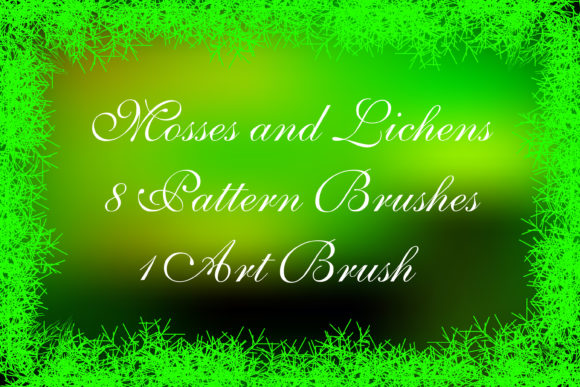
The Mosses and Lichens Illustrator Brushes package is a digital asset library designed for Adobe Illustrator. It primarily consists of vector-based brushes that replicate the appearance of moss, lichen, and other forest-floor vegetation. The core value proposition of this tool lies in its ability to generate complex, textured lines that would otherwise be time-consuming to draw manually. The package includes eight pattern brushes and one art brush, providing a variety of strokes that can be applied to paths within the software.
Compatibility is a significant factor for many users. These brushes are compatible with Illustrator CC, ensuring they function smoothly within modern workflows. However, the inclusion of AI Illustrator CS and EPS 8 original files broadens accessibility, allowing users with older versions of the software to utilize the assets. This backward compatibility is a practical consideration for freelancers or agencies working across different technical environments. Additionally, the package includes a PDF help file with screenshots, which serves as a crucial resource for users who may be less familiar with installing or customizing brush libraries.
Key Features and Functional Benefits
The primary advantage of using Mosses and Lichens Illustrator Brushes is the flexibility they offer in creating borders, frames, and decorative edging. Because these are vector-based tools, they are infinitely scalable without loss of quality. Users can easily adjust the color, size, and thickness of the moss ribbons to fit specific design constraints. This adaptability is particularly useful for creating endless friezes or continuous borders that need to wrap around various layout dimensions.
- Versatility in Application: The brushes can be used for framing illustrations, creating dividers in editorial layouts, or adding subtle textural details to packaging design.
- Customization Potential: While the preset brushes provide immediate utility, the inclusion of original files allows advanced users to modify the brushes or create new variations within their own version of Illustrator.
- Eco-Aesthetic Alignment: For brands focusing on sustainability, organic products, or outdoor activities, these brushes provide a visual language that communicates natural values effectively.
The file size of the ZIP archive is 17.3 MB, which is relatively lightweight for a design asset of this nature. This ensures quick download times and minimal storage impact, making it a low-risk addition to a designer’s resource library.
Design Applications and Ideal Use Cases
Determining when to use Mosses and Lichens Illustrator Brushes depends largely on the stylistic goals of the project. These tools are a strong fit for designs that require a soft, organic, or rustic feel. For instance, wedding invitations with a woodland theme, labels for organic skincare products, or branding for eco-tourism companies can benefit significantly from the textured edges these brushes provide.
Another effective application is in the creation of decorative frames for digital art or photography. By applying a moss brush to a rectangular path, designers can create a border that looks hand-painted or naturally grown, adding depth and interest to otherwise flat compositions. The ability to change colors means these brushes can also be adapted for seasonal designs, such as using muted greens for spring or deeper, earthier tones for autumn-themed projects.
Furthermore, the fractal and generative art aspects mentioned in relation to these tools suggest a level of complexity that mimics natural growth patterns. This makes them suitable for background textures where a subtle, non-repeating organic pattern is needed to add visual interest without overwhelming the primary content.
Considerations and Tradeoffs
While the Mosses and Lichens Illustrator Brushes offer significant benefits, there are tradeoffs to consider. Vector brushes, by nature, can increase the complexity of an Illustrator file. Applying multiple textured brushes to a single document may result in larger file sizes and potentially slower performance during editing, especially on older hardware. Designers should be mindful of overusing these detailed strokes in complex layouts.
Additionally, while the brushes are customizable, achieving a truly unique look may require a degree of technical proficiency. Users who are not comfortable manipulating anchor points or adjusting brush profiles may find themselves relying heavily on the default presets. While these presets are high-quality, they may lack the distinctiveness required for highly bespoke branding projects without further modification.
It is also important to note that these brushes are specific to Adobe Illustrator. Designers working primarily in raster-based programs like Photoshop or Procreate will not be able to use these vector assets directly, although they can be exported as high-resolution images if necessary. This limits their utility to those within the Adobe ecosystem or those willing to convert file formats.
Comparing Alternatives
When evaluating Mosses and Lichens Illustrator Brushes, it is helpful to consider alternatives. For designers seeking a more painterly or rough texture, raster brushes in Photoshop might offer a different aesthetic that is harder to achieve with clean vectors. Conversely, for those needing precise, geometric botanical illustrations, standard pen tool techniques or CAD-based plugins might be more appropriate.
Other vector brush packs exist in the market, ranging from generic foliage sets to highly specialized botanical collections. Some alternatives may offer a wider variety of plant species, while others might focus on different styles, such as watercolor or ink. The decision often comes down to the specific texture required. If the goal is a dense, mossy, or lichen-covered look, this specific pack is tailored to that niche. If the design requires distinct leaves or flowers, a broader botanical brush set might be a better investment.
Making the Decision
To determine if Mosses and Lichens Illustrator Brushes are the right choice, designers should assess their current project needs. If the workflow involves frequent creation of natural-themed borders, frames, or organic dividers, this toolset can significantly reduce production time. The inclusion of help files and multiple file formats adds value for users at different skill levels and software versions.
However, if a designer rarely works with organic textures or prefers a minimalist, geometric style, the utility of this pack may be limited. It is also advisable to consider the long-term versatility of the asset. Since the brushes can be modified, they offer potential for reuse across multiple projects, enhancing their return on investment.
Ultimately, the Mosses and Lichens Illustrator Brushes represent a specialized tool for a specific aesthetic. They excel in creating eco-friendly, naturalistic designs with ease and flexibility. For designers committed to the Adobe Illustrator platform and looking to enhance their capability in creating organic textures, this package provides a practical and efficient solution. As with any digital asset, reviewing the included help file and testing the brushes in a sample project is recommended to ensure they meet the specific technical and artistic standards of the user.