Evaluating the 33 Drop and Blob Illustrator Brushes for Vector Artwork
In the realm of digital illustration, achieving realistic textures such as water, condensation, and organic fluid shapes can be a time-consuming process. Designers often spend hours manually drawing individual droplets or adjusting gradients to simulate wet surfaces. This is where specialized toolsets like the 33 Drop and Blob Illustrator Brushes come into play. This collection offers a streamlined approach to adding atmospheric details to vector artwork, specifically targeting effects like raindrops on glass, foggy surfaces, and liquid splatters. For artists and designers evaluating whether this asset pack aligns with their workflow, understanding its capabilities, compatibility, and practical applications is essential.
Understanding the Asset Collection
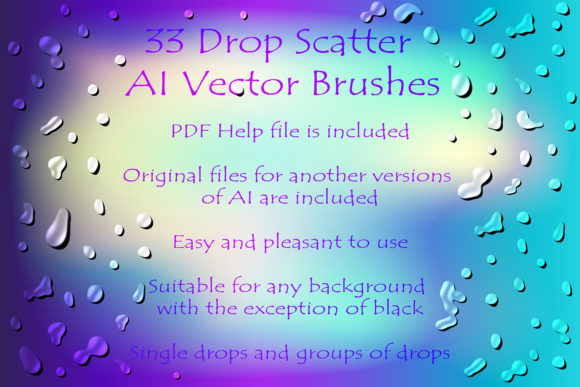
The core of this product is a set of 33 scatter vector brushes designed for Adobe Illustrator. Unlike standard calligraphic or art brushes that follow a path, scatter brushes distribute copies of an object along a path with varying degrees of randomness in size, rotation, and spacing. This specific collection focuses on liquid dynamics, including drops, sprays, blobs, and dribbles. The inclusion of grouped elements allows for more complex compositions, enabling users to create dense clusters of rain or isolated condensation spots with minimal effort.
The technical foundation of these brushes is vector-based, meaning they are scalable without loss of quality. The package includes original files in both AI (Illustrator 10) and EPS 10 formats. This backward compatibility is a significant consideration for professionals working in diverse environments or those who need to share files with clients using older software versions. The total file size of the ZIP archive is 11.3 MB, which is relatively lightweight, ensuring quick downloads and easy storage within existing project libraries.
Practical Applications and Use Cases
The primary value proposition of the 33 Drop and Blob Illustrator Brushes lies in their ability to simulate wet surfaces efficiently. One of the most common challenges in vector design is creating the "foggy glass" effect. Manually drawing hundreds of tiny, semi-transparent circles to mimic condensation is impractical for tight deadlines. With these scatter brushes, a designer can draw a single path across a glass pane element, and the brush will automatically distribute droplet shapes along that line. Adjusting the stroke weight or brush settings can further refine the density and size of the droplets, offering a high degree of control over the final aesthetic.
Beyond glass effects, these brushes are suitable for various decorative purposes. They can be used to enhance product mockups, such as beverage cans or bottles, by adding realistic water beads. In editorial illustrations, they can represent rain, sweat, or spilled liquids, adding a layer of narrative context to the artwork. The inclusion of spray and blob variations also makes them useful for abstract backgrounds or grunge-style designs where organic, irregular shapes are preferred over geometric precision.
Compatibility and Technical Considerations
When integrating new assets into a professional workflow, compatibility is a critical factor. These brushes are compatible with Adobe Illustrator CS5 and above. For users operating on modern Creative Cloud subscriptions, this presents no issue. However, designers still utilizing very legacy versions of Illustrator prior to CS5 may encounter limitations. It is worth noting that the package includes a PDF help file with screenshots, which serves as a valuable resource for users unfamiliar with installing or customizing brushes in Illustrator.
An important feature highlighted in the product description is the ability to customize the brushes. Since the original AI and EPS files are included, users are not locked into the default settings. If a specific drop shape does not fit a particular project, designers can modify the source vector art and redefine the brush in their version of Illustrator. This flexibility ensures that the tool remains adaptable to evolving style guides or specific client requests. It transforms the pack from a static set of presets into a customizable toolkit.
Benefits and Tradeoffs
The most significant benefit of using the 33 Drop and Blob Illustrator Brushes is efficiency. What might take thirty minutes to draw manually can be achieved in seconds. This speed allows designers to iterate quickly, testing different compositions of rain or condensation without committing excessive time to each variation. Additionally, because the brushes are vector-based, the resulting artwork remains resolution-independent, suitable for both web graphics and large-format print materials.
However, there are tradeoffs to consider. Scatter brushes, by nature, introduce an element of randomness. While this is beneficial for organic looks, it can sometimes result in uneven distributions that require manual tweaking. Designers seeking perfect uniformity may find themselves spending time adjusting individual anchor points or expanding the brush strokes to edit specific elements. Furthermore, overusing these brushes can lead to a repetitive look if the same preset is applied across multiple projects without modification. To maintain originality, users should leverage the editable source files to create unique variations.
Another consideration is the learning curve associated with brush settings. Achieving the desired "foggy" or "wet" look often requires experimenting with opacity, blending modes, and stroke profiles. Beginners may need to consult the included PDF guide or external tutorials to master these nuances. The brushes are tools, not automatic solutions; their effectiveness depends largely on the user’s skill in integrating them with other design elements like gradients and shadows.
Decision-Making Insights: Is This Pack Right for You?
Determining whether this brush set aligns with your needs depends on your typical project requirements. If you frequently work on designs involving beverages, weather elements, bathroom interiors, or any scenario requiring realistic water effects, this pack is a strong fit. It is particularly valuable for illustrators who prioritize speed and scalability in their workflow. The inclusion of both AI and EPS files also makes it a safe choice for agencies that must accommodate clients with varying software versions.
Conversely, if your work primarily involves flat design, geometric abstraction, or typography-heavy layouts, the utility of these brushes may be limited. In such cases, investing in typefaces or shape libraries might offer a higher return on investment. Additionally, designers who prefer complete manual control over every vector point may find the automated nature of scatter brushes restrictive, preferring to build their own liquid elements from scratch.
It is also advisable to consider existing resources. If you already possess a comprehensive library of texture brushes or have mastered the creation of custom scatter brushes, the incremental value of this specific pack may be lower. However, for those starting out or looking to expand their toolkit with specialized liquid effects, the 33 Drop and Blob Illustrator Brushes offer a cost-effective and time-saving solution.
Final Thoughts
The 33 Drop and Blob Illustrator Brushes represent a practical addition to a digital artist’s resource library. By addressing the specific challenge of creating realistic water and condensation effects, they fill a niche that is often overlooked in general-purpose brush sets. The combination of vector scalability, backward compatibility, and customizable source files provides a robust foundation for professional use. While they require some technical understanding to utilize effectively, the potential for workflow optimization makes them a worthwhile consideration for designers aiming to enhance the realism and depth of their vector artwork. As with any creative tool, the best approach is to evaluate how well it integrates with your current style and project demands, ensuring it serves as a facilitator of creativity rather than a constraint.