Evaluating Procreate Brushes Stamp Geometric Shapes for Digital Design
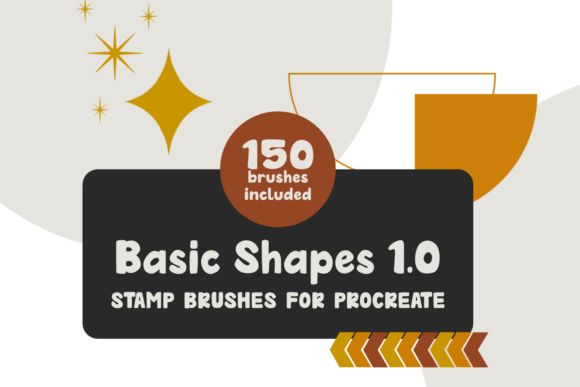
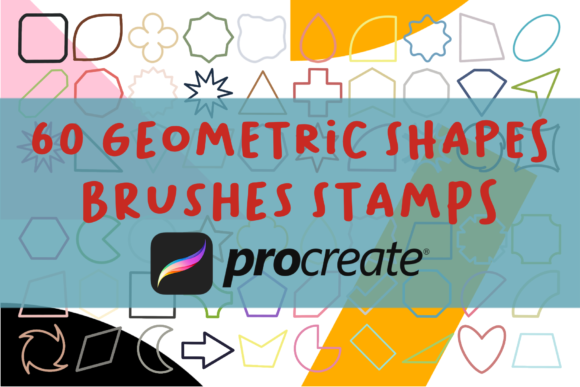
In the rapidly evolving landscape of digital illustration, efficiency often dictates the quality and volume of work a creator can produce. For professionals using the iPad as their primary canvas, the Procreate Brushes Stamp Geometric Shapes set represents more than just a collection of pre-made assets; it is a workflow optimization tool. This specific brush set, comprising 60 distinct geometric stamps and abstract outlined forms, addresses a common pain point in digital design: the repetitive manual creation of precise shapes. By integrating these stamps directly into the Procreate ecosystem, designers can significantly reduce the time spent on foundational layout tasks, allowing them to focus on composition, color theory, and conceptual development.
The Practical Value of Geometric Stamping Tools
Geometric precision is a cornerstone of modern graphic design, architectural sketching, and pattern creation. However, drawing perfect circles, hexagons, or complex abstract outlines freehand is not only difficult but also time-consuming when consistency is required. The primary strength of the Procreate Brushes Stamp Geometric Shapes lies in its ability to deliver instant, scalable geometry. Unlike standard shape tools that may feel rigid or disconnected from the artistic flow, stamp brushes allow for organic placement while maintaining mathematical accuracy.
This duality—precision paired with artistic freedom—is what makes this toolset particularly valuable for marketers, educators, and freelancers who need to produce high-quality visual content under tight deadlines. Whether you are designing social media graphics, creating educational diagrams, or developing brand identity elements, having immediate access to a diverse library of outlined shapes streamlines the iterative design process. The "abstract" nature of many included shapes further extends their utility beyond strict geometry, offering unique visual elements that can serve as backgrounds, frames, or decorative accents in contemporary digital art.
Technical Specifications and File Integrity
Upon purchase, users receive a ZIP file containing the brush set. It is crucial to understand the technical requirements before proceeding. The sole prerequisite is the Procreate App for iPad. This exclusivity means that the brushes are optimized specifically for Apple Pencil pressure sensitivity and the touch interface of the iPad. Users attempting to utilize these files on Android tablets, desktop versions of Photoshop, or other raster graphics software will find them incompatible. Therefore, verifying your hardware and software environment is a necessary first step.
The installation process is straightforward but requires attention to detail. After downloading and unzipping the file, users must import the .brushset file directly into Procreate. Once imported, the new palette appears within the brush library, ready for immediate use. This seamless integration is a significant advantage, as it avoids the clutter of external plugins or complex setup procedures. The 60 brushes are categorized to ensure easy navigation, allowing creators to locate specific shapes—such as triangles, circles, or irregular polygons—without disrupting their creative momentum.
Usability and Workflow Integration
From a usability perspective, the Procreate Brushes Stamp Geometric Shapes excel in flexibility. Each stamp behaves like a traditional brush stroke, meaning that size, opacity, and rotation can be adjusted dynamically using the Apple Pencil or on-screen sliders. This level of control is essential for creating layered compositions where depth and perspective are required. For instance, a marketer creating an infographic can quickly stamp a series of circles to represent data points, adjusting their opacity to create a sense of hierarchy without leaving the canvas.
Furthermore, the outlined nature of these shapes offers substantial post-processing flexibility. Because the stamps are essentially vector-like paths rendered as pixels, they can be easily manipulated using Procreate’s transformation tools. Designers can stretch, skew, or rotate individual stamps to fit specific layout constraints. This adaptability ensures that the brushes do not force a rigid aesthetic but rather serve as a foundational layer upon which unique styles can be built. For educators creating visual aids, this means one set of brushes can serve multiple subjects, from mathematics to art history, by simply altering the color and arrangement of the geometric elements.
Quality and Consistency in Professional Output
Consistency is a hallmark of professional design. When working on large-scale projects, such as branding packages or serialized social media content, maintaining a uniform visual language is critical. The Procreate Brushes Stamp Geometric Shapes provide this consistency by ensuring that every instance of a specific shape is identical in proportion and line weight. This reliability eliminates the subtle variations that occur with hand-drawn elements, which can sometimes appear unpolished in corporate or commercial contexts.
However, it is important to note that while the shapes are consistent, their application should remain dynamic. Over-reliance on any single asset library can lead to generic-looking designs. The most effective use of these brushes involves combining them with custom textures, hand-drawn annotations, and varied color palettes. By treating the geometric stamps as structural components rather than final decorative elements, creators can maintain a unique artistic voice while benefiting from the efficiency of pre-made assets.
Target Audience and Ideal Use Cases
Who benefits most from this tool? The audience is broad but specific in its needs. Freelance graphic designers will appreciate the time saved on layout construction. Small business owners managing their own marketing materials can produce polished visuals without extensive design training. Educators and publishers can create clear, engaging diagrams and worksheets. Additionally, serious hobbyists looking to elevate their digital journaling or planning setups will find the abstract outlined shapes particularly useful for creating aesthetically pleasing spreads.
In real-world scenarios, these brushes perform exceptionally well in:
- Social Media Content Creation: Quickly generating eye-catching backgrounds and frames for Instagram stories or Pinterest pins.
- Presentation Design: Adding visual interest to slide decks with consistent geometric motifs.
- Pattern Design: Creating seamless repeats for textiles or wallpapers by arranging stamped shapes in grid formations.
- Architectural and Interior Sketching: Providing quick reference shapes for furniture, windows, and structural elements.
Limitations and Ethical Considerations
While the Procreate Brushes Stamp Geometric Shapes offer significant advantages, they are not without limitations. As mentioned, they are strictly confined to the Procreate ecosystem. Users invested in cross-platform workflows may find this restrictive. Additionally, because these are stamp brushes, they lack the parametric editability of true vector shapes found in software like Adobe Illustrator. Once stamped, the shape is rasterized, meaning excessive scaling up may result in pixelation if the canvas resolution is insufficient.
Equally important are the ethical and legal constraints associated with the purchase. The product license explicitly prohibits sharing the product or reselling it to others. This is a standard but critical condition for digital assets. Creators must respect intellectual property rights by ensuring that the brush set remains for personal or commercial use within their own projects, not for redistribution. Violating these terms not only undermines the developer’s livelihood but also risks legal repercussions for the user. Before purchasing, ensure that your intended use aligns with these guidelines.
Final Assessment of Long-Term Value
When evaluating the long-term value of the Procreate Brushes Stamp Geometric Shapes, the key metric is time savings versus cost. For anyone producing digital content regularly, the hours saved by avoiding manual shape construction quickly outweigh the initial investment. The durability of geometric design trends further ensures that these brushes will remain relevant for years. Unlike trend-specific illustrations that may date quickly, basic and abstract geometric forms are timeless elements of visual communication.
In conclusion, this brush set is a practical, high-utility resource for iPad-based creators. It bridges the gap between artistic expression and technical precision, offering a reliable solution for those who value efficiency without compromising on quality. By understanding its capabilities, limitations, and proper usage contexts, professionals and hobbyists alike can integrate these tools into their workflows to enhance productivity and elevate the visual standard of their digital projects.