Evaluating the Procreate 20 Glitter Brushes Set for Digital Illustration
Digital illustration has evolved significantly, allowing artists to replicate traditional media with increasing accuracy. Among the most sought-after effects in digital art is the simulation of sparkle, shimmer, and texture. The Procreate 20 Glitter Brushes set aims to address this need by providing a curated collection of tools designed specifically for the Procreate application on iPad. For artists considering expanding their digital toolkit, understanding the utility, compatibility, and practical application of these brushes is essential before making a purchase decision.
Understanding the Product Offering
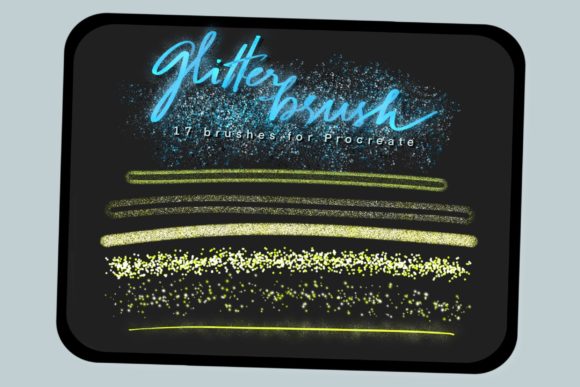
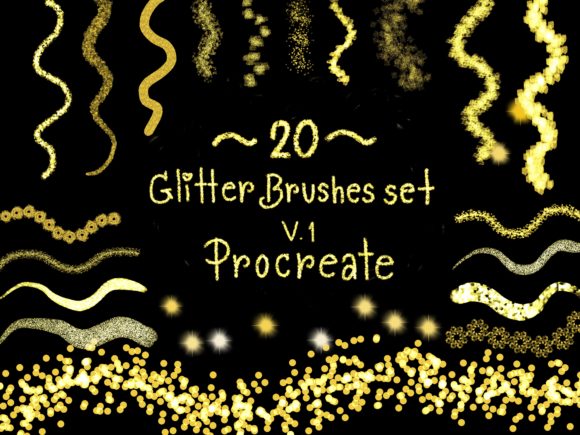
The core of this product is a digital asset pack containing twenty distinct brush presets. Unlike physical goods, these are software configurations that alter how the Apple Pencil interacts with the Procreate canvas. The primary function of the Procreate 20 Glitter Brushes is to generate randomized, textured marks that mimic the appearance of glitter, sequins, or coarse pigment.
When evaluating this set, it is important to recognize that it is not a standalone application. It is an add-on resource that requires the Procreate app to function. The value proposition lies in the time saved by not having to manually create these complex textures from scratch. Instead of adjusting individual settings for scatter, jitter, and opacity to achieve a sparkling effect, users can apply these pre-configured brushes to achieve immediate results.
Key Benefits and Artistic Applications
Artists often seek out specialized brush sets to overcome the "flat" look that can sometimes occur in digital drawings. The main advantage of using a dedicated glitter brush set is the ability to add depth and visual interest quickly. Here are several scenarios where these brushes may prove beneficial:
- Character Design: Adding subtle shimmer to jewelry, magical effects, or clothing details can enhance the realism and appeal of character illustrations.
- Fantasy Landscapes: Creating starry skies, magical dust, or reflective water surfaces becomes more efficient with brushes that naturally scatter particles.
- Greeting Cards and Invitations: For commercial designers creating digital prints, simulating foil stamping or glitter accents can add a premium feel to the design without the cost of physical materials.
- Texture Layering: These brushes can be used not just for obvious sparkle, but also for adding noise and grain to backgrounds, breaking up solid colors and adding organic texture.
The inclusion of twenty different variations allows for versatility. Rather than a single generic sparkle effect, a varied set enables the artist to choose between fine dust, coarse chunks, linear streaks, or dense clusters. This variety supports a more nuanced approach to digital painting, allowing for greater control over the final aesthetic.
Compatibility and Technical Requirements
A critical consideration for any digital asset is compatibility. The Procreate 20 Glitter Brushes are designed exclusively for the Procreate app. This imposes specific hardware and software requirements that potential buyers must verify.
First, the user must own an iPad capable of running the Procreate application. Second, and perhaps more importantly, the functionality of these brushes relies heavily on pressure sensitivity. To achieve the intended effect—where the density and size of the glitter particles respond to how hard the user presses—the artist needs an Apple Pencil or a third-party stylus that supports pressure sensitivity. Using a finger or a basic capacitive stylus will likely result in a uniform, less dynamic application of the brush, diminishing the quality of the effect.
It is also worth noting that these brushes are not compatible with other digital art software such as Adobe Fresco, Photoshop, or Clip Studio Paint unless those programs support the import of Procreate-specific brush files (which is generally not the case). Users invested in ecosystems other than Procreate should look for alternative formats like .abr (Photoshop) or .brushset (Clip Studio).
Installation and Usability
The workflow for integrating these brushes into an existing library is straightforward, which is a positive factor for users who may not be technically inclined. The process typically involves three steps:
- Purchase and Download: After payment confirmation, the user receives an email containing a download link. The file is usually a .brushset format.
- File Management: The user downloads the file to their iPad, often saving it to the Files app or opening it directly from the email client.
- Importing: Within the Procreate app, tapping on the brush library and selecting "Import" allows the user to add the new set. Once imported, the twenty brushes appear as a new group, ready for immediate use.
This ease of installation lowers the barrier to entry. However, users should be aware that managing large numbers of brush sets can clutter the Procreate interface. It is advisable to organize brushes into folders or delete unused sets to maintain an efficient workflow.
Tradeoffs and Considerations
While specialized brush sets offer convenience, there are tradeoffs to consider. Relying heavily on preset brushes can sometimes hinder the development of fundamental digital painting skills. Artists who understand how to manipulate standard round brushes using opacity, flow, and blending modes can often recreate similar effects without purchasing additional assets. Therefore, this set is best viewed as a productivity tool rather than a necessity.
Another consideration is the stylistic fit. Glitter effects are niche. If an artist primarily works in flat design, technical illustration, or realistic portraiture without fantastical elements, the utility of twenty glitter brushes may be limited. In such cases, a more general-purpose texture or ink brush set might offer better long-term value.
Additionally, digital trends change. While glitter effects are popular in certain genres like fantasy and kawaii art, they may not align with minimalist or corporate design aesthetics. Buyers should assess their current project pipeline to determine if there is an immediate or foreseeable need for these specific textures.
Decision-Making Insights
To determine if the Procreate 20 Glitter Brushes align with your goals, consider the following questions:
- Do you frequently add sparkles or textures manually? If you find yourself spending significant time tweaking standard brushes to create glitter effects, this set can streamline your workflow.
- Is your hardware compatible? Ensure you have an iPad and a pressure-sensitive stylus. Without these, the brushes will not perform as intended.
- Does your style benefit from embellishment? If your art style leans towards whimsical, magical, or decorative themes, these brushes are a strong fit. For hyper-realistic or minimal styles, they may remain unused.
Ultimately, the Procreate 20 Glitter Brushes set represents a targeted solution for a specific artistic need. It offers convenience and variety for Procreate users looking to enhance their illustrations with shimmering effects. By weighing the compatibility requirements against your artistic style and workflow preferences, you can make an informed decision about whether this digital tool adds value to your creative process.
Thank you for shopping Infinity Art works. Have a nice day.