Unlocking Medieval Magic: A Guide to Faerie Illustrator Brushes and Ornament Patterns
In the realm of digital illustration, few styles capture the imagination quite like the medieval and magical aesthetic. Whether you are designing a fantasy book cover, creating intricate game assets, or simply adding a touch of enchantment to a graphic design project, the right tools can make all the difference. This is where Medieval Faerie Illustrator Brushes come into play. These specialized digital tools are not just simple stamps; they are sophisticated vectors designed to streamline the creation of complex, ornate designs that would otherwise take hours to draw by hand.
For artists and designers, the challenge often lies in balancing detail with efficiency. Hand-drawing polished metal ribbons, intricate friezes, and decorative edging requires a steady hand and a significant time investment. Furthermore, maintaining consistency in line weight and perspective across a long border can be difficult. The primary goal for many creatives is to achieve a high-end, professional look without sacrificing their workflow speed. Medieval Faerie Illustrator Brushes address this need by providing pre-built, scalable vector patterns that adapt seamlessly to any path you draw.
Understanding the Power of Vector Pattern Brushes
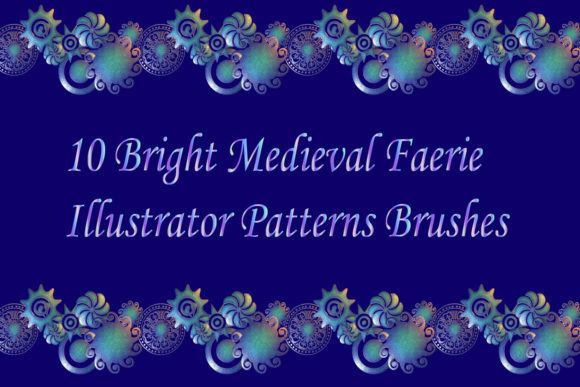
At their core, these brushes are built on the robust architecture of Adobe Illustrator. Unlike raster brushes, which can lose quality when scaled up, the Ornament brassy pattern vector Adobe Illustrator brushes included in this collection remain crisp and sharp at any size. This is crucial for professional work where designs may need to be printed on large formats or viewed on high-resolution screens. The collection features ten distinct magic metallic pattern brushes, each crafted with different materials and textures to provide variety and depth to your artwork.
The term "brassy" refers to the specific material finish applied to these vectors, giving them a realistic, polished metal appearance. However, the versatility of the set allows for extensive customization. Because the original files are provided in both AI (Illustrator 10) and EPS 10 formats, users have complete control over the appearance. You are not locked into a single color scheme or texture. With a few clicks, you can change the hue to gold, silver, copper, or even fantastical colors like iridescent blue or deep crimson, allowing the brush to fit perfectly into your specific color palette.
Solving Common Design Challenges
One of the most frequent hurdles in medieval-style design is creating seamless borders and frames. Traditional methods involve drawing a segment, copying it, aligning it, and repeating the process until the border is complete. This often results in visible seams or misaligned corners. Medieval Faerie Illustrator Brushes solve this by utilizing Illustrator’s pattern brush functionality. When you apply these brushes to a path, the software automatically tiles the pattern, ensuring a continuous, unbroken flow. While corner elements are not added in this specific pack, the seamless nature of the straight-edge patterns makes it incredibly easy to create endless polished metal ribbons and edging that look professionally crafted.
Another significant advantage is the ability to change the size of the decoration instantly. In a traditional workflow, resizing a complex ornament might require redrawing details to maintain clarity. With these vector brushes, you can scale the stroke width up or down, and the detail remains intact. This flexibility is invaluable when you are experimenting with layout compositions. You can quickly test how a thicker, more imposing border looks compared to a delicate, thin frieze without having to recreate the asset from scratch.
Practical Applications and Creative Outcomes
The utility of Medieval Faerie Illustrator Brushes extends far beyond simple borders. Here are several practical ways designers can implement these tools to enhance their projects:
- Book Cover Design: Fantasy novels often require elaborate frames around titles or central imagery. These metallic brushes can create a sense of age and value, mimicking the look of embossed leather and metal clasps found on ancient tomes.
- Game UI Elements: For interface designers working on role-playing games (RPGs), these brushes can be used to create health bars, menu borders, and inventory slots that fit naturally within a medieval or magical world setting.
- Invitation and Stationery: Wedding invitations or event flyers with a historical or fantasy theme benefit greatly from elegant, metallic edging. The polished look of the brassy patterns adds a premium feel to printed materials.
- Logo Embellishment: Brands that want to convey heritage, luxury, or mystique can use these ornaments to frame logos or separate text elements, adding a layer of sophistication.
The outcome of using these brushes is a significant reduction in production time while simultaneously elevating the visual quality of the final piece. Instead of spending hours perfecting a single metallic ribbon, a designer can apply the brush in seconds and move on to other creative aspects of the project, such as composition and color theory.
Technical Compatibility and Ease of Use
Accessibility is a key factor when choosing digital assets. This collection is designed to be compatible with Adobe Illustrator CS5 and above, ensuring that both users with the latest software and those with older, stable versions can utilize the brushes effectively. The inclusion of a PDF help file with screenshots is a thoughtful addition that supports users of all skill levels. For beginners, this guide provides step-by-step instructions on how to install and apply the brushes. For advanced users, it offers insights into how to modify the existing brushes or create new ones based on the provided templates.
The package is delivered as a ZIP archive totaling 65.8 MB. This size is reasonable given the high-quality vector data contained within. The inclusion of both AI and EPS original files ensures maximum compatibility. EPS files are particularly useful for users who might want to import the vectors into other design software that supports the format, although the primary functionality is optimized for Illustrator. The fact that you can make any brush for yourself in your Illustrator version empowers users to expand the library. If you need a specific variation not included in the initial ten, you can deconstruct the existing brushes and rebuild them to suit your unique needs.
Tailoring the Approach to Your Workflow
Different users will approach Medieval Faerie Illustrator Brushes in different ways, depending on their expertise and project requirements. A novice illustrator might use the brushes exactly as they are, applying them to simple shapes to learn how pattern brushes behave. This is an excellent way to build confidence and understand the mechanics of vector decoration. On the other hand, a seasoned professional might use the brushes as a base layer, expanding the strokes and modifying the anchor points to create entirely new custom ornaments. They might combine multiple brushes, layering a thin gold line over a thicker brass pattern to create a multi-dimensional effect.
For those focused on rapid prototyping, these brushes allow for quick iteration. You can sketch out a layout, apply the metallic patterns, and present a near-final concept to a client in a fraction of the time it would take to render the details manually. This agility is a competitive advantage in freelance and agency environments where turnaround times are tight.
It is also worth noting that while the pack does not include corner elements, this limitation can be turned into a creative opportunity. Designers can manually create custom corners that match the style of the brushes, ensuring a unique look that sets their work apart from others who might use standard, pre-made corner sets. This hybrid approach—using automated brushes for straight lines and custom drawing for corners—offers the best of both worlds: speed and uniqueness.
Final Thoughts on Enhancing Your Digital Toolkit
Incorporating Medieval Faerie Illustrator Brushes into your digital toolkit is an investment in both efficiency and artistic quality. The ability to generate endless polished metal ribbons, friezes, and edging with minimal effort allows you to focus on the broader creative vision of your project. The high level of detail, combined with the flexibility of vector graphics, ensures that your designs will look stunning regardless of the output medium.
Whether you are a hobbyist looking to add some magic to your personal projects or a professional designer seeking to streamline your workflow, these brushes offer a practical and powerful solution. By leveraging the power of Adobe Illustrator’s pattern brush technology, you can achieve complex, medieval-inspired aesthetics with ease. As with any creative resource, the true value lies in how you use it. Experiment with the different materials, adjust the sizes, and integrate these ornaments into your unique style. If you find these tools helpful in enhancing your work, consider rating the product to support the creators and help other artists discover this valuable resource.