Unlocking Digital Creativity: A Guide to Procreate Uppercase Brush Sets and Stamps
In the rapidly evolving world of digital art, tools are no longer just instruments; they are extensions of the artist’s imagination. For users of the iPad-based application Procreate, the ecosystem of custom assets has transformed simple sketches into professional-grade designs. Among the most versatile and popular additions to this toolkit are specialized brush sets, particularly those focused on typography and graphic elements. This article explores the significance of the Uppercase Brush Set, a collection of Procreate stamps designed to streamline the creative process for designers, planners, and hobbyists alike.
Understanding Procreate Brushes and Stamps
Before diving into specific products, it is essential to understand the distinction between standard brushes and stamp brushes within the Procreate environment. A traditional Procreate brush reacts to pressure, tilt, and speed, mimicking real-world media like charcoal, watercolor, or ink. In contrast, a stamp brush (often referred to as a shape brush or image stamp) places a pre-defined image onto the canvas with a single tap or stroke.
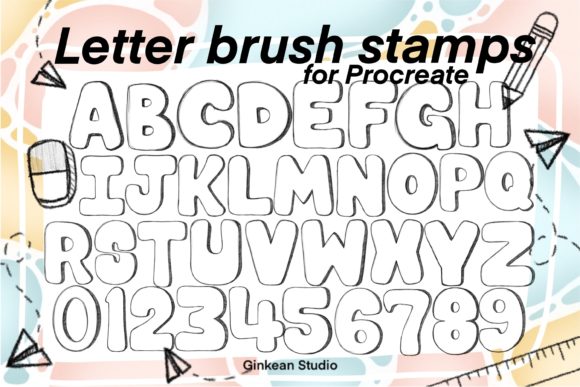
The Uppercase Brush Set falls into the latter category. Instead of painting a letter stroke by stroke, these brushes allow users to "stamp" perfectly formed uppercase letters, numbers, and symbols directly onto their artwork. This functionality bridges the gap between hand-lettering and digital typography, offering the aesthetic charm of handmade graphics with the efficiency of digital tools.
The Composition of the Uppercase Brush Kit
A comprehensive brush pack like the one discussed here is designed for completeness and utility. Typically, such a kit includes:
- 26 Alphabet Brush Stamps: Covering every letter from A to Z in uppercase format.
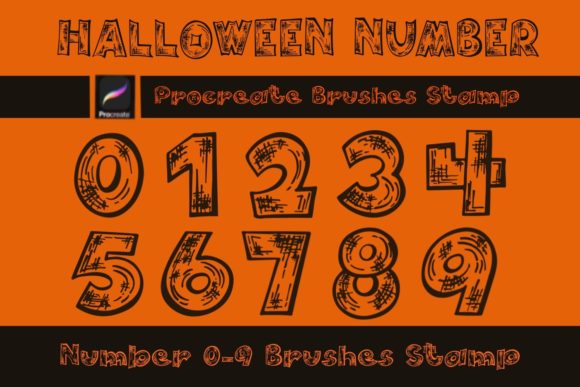
- Numerical Stamps: Digits 0 through 9, essential for pricing, dates, and lists.
- Symbol Stamps: Five common symbols (such as ampersands, stars, or arrows) to add decorative flair.
In total, this results in 41 brush stamps contained within a single zipped file. This consolidation makes it easy for users to download, unzip, and import the entire library into their Procreate app in one seamless motion. It is crucial to note that these tools are only compatible with Procreate and require the most updated version of the software to ensure smooth performance and compatibility with the latest brush engine features.
Practical Applications in Modern Digital Workflows
Why would a creator choose a letter brushes Procreate brush set over typing text with the built-in text tool? The answer lies in texture, personality, and workflow efficiency. Here is how these tools fit into various aspects of modern creativity:
1. Social Media Content Creation
Instagram posts, stories, and Pinterest pins thrive on visual appeal. Standard fonts can often look sterile or generic. By using an Uppercase brush set, creators can overlay textured, hand-drawn style letters onto their photos. This adds a layer of authenticity and warmth that resonates with audiences. For example, a coffee shop owner can stamp the word "FRESH" over a photo of morning brews, creating a branded look without needing advanced graphic design skills.
2. Digital Planning and Journaling
The rise of digital planning on iPads has created a huge demand for customizable assets. Users of apps like GoodNotes or Notability often import Procreate creations. With Procreate tools like alphabet stamps, planners can quickly create headers for weekly spreads, label habit trackers, or decorate daily logs. The consistency of the brush set ensures that the aesthetic remains cohesive throughout the planner, while the ease of use saves hours of manual lettering time.
3. Graphic Design and Branding
For small business owners and freelance designers, time is money. Creating custom logos or marketing materials often requires unique typography. A brush kit allows designers to draft concepts rapidly. They can arrange letters to test kerning and layout before committing to a final vector design. Furthermore, the imperfect, organic nature of brush stamps can serve as the final aesthetic for brands aiming for a boutique, artisanal vibe.
How to Maximize the Value of Your Brush Pack
Owning the tool is only the first step; mastering its application is where true creativity emerges. Here are some strategies to get the most out of your Procreate uppercase brush stamps:
- Experiment with Layer Styles: Once a letter is stamped, it resides on its own layer. You can change the color, adjust opacity, or apply blending modes (like Multiply or Overlay) to integrate the text seamlessly with background textures.
- Combine with Hand-Drawn Elements: Use the stamps for structure and add hand-drawn flourishes, underlines, or shadows around them. This hybrid approach maintains the speed of stamps while retaining the unique touch of the artist.
- Utilize the Transform Tool: Do not be afraid to resize, rotate, or distort the stamped letters. Slight irregularities in size and angle can make a composition feel more dynamic and less "computer-generated."
- Create Custom Palettes: Since the brushes are monochromatic by default, create a saved color palette in Procreate that matches your brand or project theme. This ensures that every stamp you place adheres to your visual identity.
Common Misunderstandings About Digital Brushes
New users often encounter a few misconceptions when starting with Procreate brushes. Clarifying these can enhance the user experience:
Misconception 1: Stamps are cheating.
Many beginners feel that using stamps detracts from their artistic integrity. However, professional illustrators have used stencils, stamps, and type blocks for centuries. Digital stamps are simply the modern equivalent. They are tools for efficiency, allowing artists to focus on composition and storytelling rather than repetitive mechanical tasks.
Misconception 2: One size fits all.
Some users assume that a brush set will look identical in every context. In reality, the appearance of a stamp depends heavily on the canvas resolution and the brush settings. Adjusting the "size jitter" or "opacity jitter" in the brush studio can introduce variation, making repeated use of the same letter look natural and organic.
Misconception 3: Compatibility is universal.
As noted earlier, this specific brush pack is designed exclusively for Procreate. Attempting to use these files in Photoshop, Clip Studio Paint, or other software without conversion will not work. Always ensure your Procreate app is updated to the latest version to avoid import errors or rendering issues.
The Broader Impact on Digital Literacy and Creativity
The accessibility of tools like the Uppercase Brush Set reflects a broader trend in technology: the democratization of design. In the past, creating polished typographic graphics required expensive software and years of training in type design. Today, a student, a small business owner, or a hobbyist can produce high-quality visual content with intuitive tools.
This shift empowers individuals to express themselves more effectively in digital spaces. Whether it is a teacher creating engaging worksheets, a marketer designing eye-catching ads, or a teenager decorating their digital diary, these Procreate tools lower the barrier to entry for visual communication. They encourage experimentation, allowing users to play with form and layout without the fear of making irreversible mistakes.
Conclusion
The Uppercase Brush Set is more than just a collection of 41 digital stamps; it is a catalyst for creativity. By combining the convenience of digital technology with the aesthetic appeal of hand-crafted lettering, it offers a powerful solution for modern content creators. Whether you are designing for Instagram posts, organizing your life through digital planning, or simply exploring art for fun, these brushes provide the flexibility and quality needed to bring your vision to life.
As you integrate these letter brushes into your workflow, remember that the best tool is the one that helps you create consistently. Embrace the efficiency of stamps, experiment with their application, and let your unique style shine through every stamped letter. For those ready to elevate their digital art game, downloading a comprehensive Procreate brush set is a small investment with a significant return in creative potential.