Mastering Seamless Pattern Brushes for Procreate: A Guide for Digital Designers
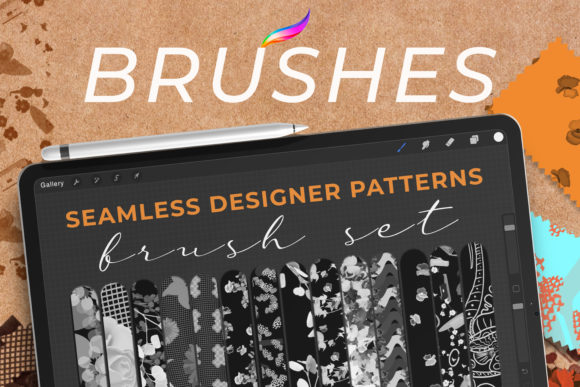
In the rapidly evolving landscape of digital illustration, efficiency and consistency are paramount. For designers working across web interfaces, physical stationery, wedding invitations, packaging, and wall art, the ability to create repeatable, high-quality textures without manual redundancy is a game-changer. This is where Seamless Pattern Brushes for Procreate become an indispensable tool. Unlike standard brushes that paint a single stroke, these specialized tools allow artists to generate continuous, repeating motifs with every swipe of the Apple Pencil. By leveraging brushes based on sophisticated surface pattern designs, creators can bridge the gap between hand-drawn authenticity and digital precision.
The Mechanics of Surface Pattern Design in a Digital Workspace
Understanding the underlying technology of seamless pattern brushes requires a shift in how one views digital painting. Traditional brush engines in applications like Procreate rely on spacing, jitter, and scattering to distribute a stamp along a path. However, true seamless pattern brushes operate on a more complex algorithmic foundation. They are designed to tile perfectly, meaning the end of one brush stroke connects flawlessly to the beginning of the next, or the edges of the stamped image align without visible seams when repeated.
These brushes are often built from vector-based or high-resolution raster surface patterns. When a designer selects a brush categorized under seamless floral, geometric tile, or organic texture, they are not just selecting a color or shape; they are activating a pre-configured system of repetition. This ensures that whether the stroke is two inches long or twenty inches long, the density and alignment of the pattern remain consistent. This technical reliability is crucial for professional workflows where scalability and print readiness are non-negotiable.
Transforming Web Design with Dynamic Textures
Web design has moved far beyond flat colors and static images. Modern interfaces demand depth, tactility, and visual interest to engage users. Seamless pattern brushes offer web designers a rapid method to create unique background textures, hero section elements, and decorative borders. Because these brushes generate vector-like clarity or high-resolution raster details, they can be scaled for retina displays without losing fidelity.
Consider a lifestyle brand website aiming for a boutique aesthetic. Instead of sourcing generic stock photos, a designer can use a custom seamless brush to paint a subtle, hand-drawn linen texture across the background. This adds a layer of sophistication and brand identity that feels organic rather than manufactured. Furthermore, because the patterns are seamless, they can be used as CSS background repeats, significantly reducing file sizes and improving load times compared to large, static image files. The ability to tweak colors and opacity directly within Procreate before exporting allows for rapid A/B testing of visual themes.
Elevating Stationery and Wedding Invitations
The stationery industry, particularly the niche of wedding invitations, relies heavily on intricate details and personalized touches. Couples increasingly seek bespoke designs that reflect their unique story, moving away from mass-produced templates. Here, Seamless Pattern Brushes for Procreate empower independent designers and calligraphers to produce high-volume, high-quality work efficiently.
A common challenge in invitation design is creating borders or background washes that feel hand-painted but maintain structural integrity. A seamless watercolor brush can lay down a soft, bleeding edge that repeats perfectly around a rectangular card layout. Similarly, botanical brushes can generate dense foliage frames that wrap around text blocks without awkward gaps or overlapping errors. This capability allows designers to focus on typography and layout composition, knowing that the decorative elements will align precisely. The result is a product that feels artisanal and luxurious, commanding a higher market value.
Packaging Design: Consistency at Scale
Packaging design presents a unique set of challenges, primarily concerning how a two-dimensional design wraps around a three-dimensional object. Patterns must flow continuously across seams, folds, and curves. Using traditional methods, ensuring this continuity requires meticulous manual adjustment in software like Adobe Illustrator or Photoshop. Seamless pattern brushes streamline this process by providing a predictable, repeatable unit of design.
For example, a cosmetic brand launching a new line might require a distinct geometric pattern for their box lids and tube wrappers. By using a seamless geometric brush in Procreate, the designer can paint the motif directly onto a digital mockup of the packaging. The brush ensures that the pattern repeats uniformly, making it easier to visualize how the design will look when printed and assembled. Moreover, these brushes facilitate the creation of "all-over" prints, where the pattern covers the entire surface without a focal point, a popular trend in sustainable packaging where minimal ink coverage is often desired for eco-friendly materials.
Wall Art and Interior Decor Trends
The rise of print-on-demand services has democratized the wall art market, allowing artists to sell their work globally without holding inventory. Success in this arena depends on creating designs that resonate with interior design trends, such as biophilic design, maximalism, or mid-century modern aesthetics. Seamless pattern brushes are instrumental in creating large-scale prints that maintain quality regardless of size.
Artists can use these tools to generate expansive murals or repeating wallpaper designs. A brush based on a mid-century atomic starburst pattern, for instance, can be used to fill a large canvas quickly. The key advantage here is the ability to experiment with scale and color palettes rapidly. An artist can test how a dense floral pattern looks in muted earth tones versus vibrant jewel tones with just a few clicks. This agility allows creators to respond quickly to trending interior styles, ensuring their portfolio remains relevant and commercially viable.
Texture Design for Digital and Physical Media
Beyond recognizable motifs, there is a growing demand for abstract textures. These are essential for adding depth to digital compositions, creating realistic material simulations, or serving as bases for mixed-media art. Seamless texture brushes—such as those mimicking concrete, paper grain, fabric weave, or distressed metal—provide a foundational layer that enhances visual realism.
In digital painting, these textures can be used as clipping masks or overlay layers to break up uniform colors and add grit. For physical media, such as textile design, these brushes help visualize how a fabric might look when printed. The seamless nature ensures that the texture does not appear tiled or artificial when viewed up close. This level of detail is critical for professionals who need to convey tactile qualities through visual means, whether they are designing for a video game environment or a fashion collection.
Workflow Integration and Best Practices
To fully leverage the potential of these tools, designers must integrate them into a cohesive workflow. Start by organizing brushes into logical sets based on style or application, such as "Botanical," "Geometric," or "Abstract." This reduces search time and encourages experimentation. When creating custom brushes, ensure the source image is truly seamless. This can be verified by offsetting the image in Procreate and checking for visible lines or discontinuities.
It is also important to consider resolution. While Procreate allows for large canvases, exporting for print requires high DPI (dots per inch). Designers should work at the final print resolution or higher to ensure that the intricate details of the pattern brushes remain sharp. Additionally, utilizing layer modes such as Multiply, Overlay, or Screen can dramatically alter the appearance of the pattern, allowing for complex compositing without altering the original brush stroke.
The Future of Pattern Creation
As tablet hardware becomes more powerful and software algorithms more sophisticated, the capabilities of seamless pattern brushes will continue to expand. We are likely to see more dynamic brushes that respond to pressure and tilt in nuanced ways, allowing for even greater variation within a repeating pattern. This evolution will further blur the line between digital efficiency and hand-crafted artistry.
For professionals and hobbyists alike, mastering these tools is not just about speed; it is about expanding creative possibilities. By understanding the mechanics, applications, and best practices of Seamless Pattern Brushes for Procreate, designers can produce work that is both visually stunning and commercially robust. Whether creating a delicate wedding invitation suite or a bold packaging design, these brushes provide the structural foundation needed to bring complex surface patterns to life with confidence and precision.