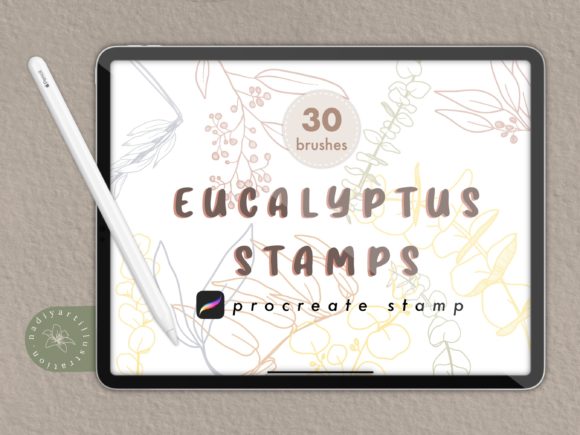
Mastering Digital Botany: A Guide to Eucalyptus Procreate Stamp Brushes
In the rapidly evolving world of digital illustration, efficiency and aesthetic quality often go hand in hand. For artists, designers, and hobbyists using iPad-based software, the demand for tools that streamline the creative process without sacrificing artistic integrity is higher than ever. One such tool that has gained significant traction among the creative community is the Eucalyptus Procreate Stamp Brush. These specialized digital assets allow users to incorporate intricate, hand-drawn botanical elements into their artwork with a single tap, transforming complex compositions into manageable, enjoyable tasks.
Understanding the utility and application of these brushes requires a look at how digital stamping works, why eucalyptus specifically has become a design staple, and how high-quality resources can elevate your workflow. Whether you are creating wedding invitations, social media graphics, or detailed nature journals, knowing how to leverage Hand Drawn Eucalyptus Stamps for Procreate can significantly enhance your output.
The Evolution of Digital Stamping in Procreate
To appreciate the value of a Procreate brush stamp, one must first understand the mechanics behind it. In traditional art, creating repetitive natural elements like leaves, branches, or flowers requires immense patience and steady hand control. In digital art, specifically within the Procreate ecosystem, this process is revolutionized through "stamp" functionality. Unlike standard painting brushes that lay down continuous strokes, a Stamp brush places a pre-defined image onto the canvas each time you tap or swipe.
This technology is not new, but its refinement in recent versions of Procreate (specifically Procreate 5x or later) has made it more intuitive and powerful. When you utilize Eucalyptus stamp brushes, you are not just pasting a static clip-art image; you are engaging with a dynamic tool that can often be adjusted for size, opacity, and rotation. This allows for the creation of organic, non-repetitive patterns that mimic the randomness of nature. The significance here lies in the balance between automation and artistic control. The artist remains the director of the composition, while the brush handles the tedious rendering of individual leaf structures.
Why Eucalyptus? The Appeal of Modern Foliage
You might wonder why there is a specific focus on eucalyptus. In contemporary design, particularly in weddings, branding, and lifestyle photography, eucalyptus has become synonymous with modern elegance. Its muted green tones, varied leaf shapes, and airy structure provide a perfect backdrop that does not overpower primary subjects. Consequently, the demand for a reliable Eucalyptus Stamp has surged among graphic designers and illustrators.
Using a Digital Foliage stamp for procreate allows creators to tap into this trend effortlessly. Instead of spending hours drawing each serrated edge and vein of a leaf, artists can build lush garlands, wreaths, and borders in minutes. This practical relevance extends beyond mere convenience; it enables small business owners and freelance artists to take on more projects by reducing the time spent on decorative elements.
What to Look for in High-Quality Brush Sets
Not all digital brushes are created equal. When searching for Hand Drawn Eucalyptus Stamp resources, quality is paramount. A poor-quality stamp may appear pixelated when resized or lack the transparency needed to layer elements naturally. Here is what defines a premium set:
- Resolution: High-quality brushes should be made at 300 dpi (dots per inch). This ensures that whether you are designing a small Instagram post or a large-format print, the edges of the leaves remain crisp and clean.
- Variety: A comprehensive set should include various angles and types of eucalyptus leaves—some broad, some narrow, some clustered, and some sparse. This variety prevents your artwork from looking repetitive or artificial.
- File Format: Professional sets are typically delivered in a .brushset file format, contained within a ZIP file. This format is native to Procreate and ensures easy installation and organization within the app.
For instance, a top-tier package might offer a single ZIP file containing one meticulously crafted .brushset file. This simplicity ensures that users spend less time managing files and more time creating. It is crucial to verify compatibility; most modern stamp brushes require Procreate 5x or later to function correctly, leveraging the updated brush engine for better responsiveness and texture handling.
Practical Applications in Daily Creativity
The versatility of Eucalyptus Procreate Stamp Brushes means they fit seamlessly into various creative workflows. Let us explore a few scenarios where these tools shine:
- Wedding and Event Stationery: Designers often need to create cohesive themes for invitations, save-the-dates, and menu cards. Using a Procreate stamp brushes set, a designer can quickly frame text with elegant eucalyptus branches, adjusting the opacity to ensure the text remains readable.
- Social Media Content: Influencers and brands frequently need visually appealing backgrounds for quotes or product announcements. A Digital Foliage stamp for procreate allows for the rapid creation of unique backgrounds that align with current aesthetic trends.
- Digital Journaling: For those who use iPads for planning and journaling, adding hand-drawn elements adds a personal touch. Instead of struggling to draw consistent foliage, users can decorate their daily logs with beautiful, pre-made stamps that look authentically hand-drawn.
Common Misunderstandings About Stamp Brushes
A common assumption among beginners is that using stamp brushes is "cheating" or results in generic-looking art. This is a misconception. The artistry lies in how the stamps are used. A skilled artist will rotate, resize, and layer the Eucalyptus Stamp elements to create depth and movement. They might change the color hue to match a specific lighting condition or add hand-painted highlights to integrate the stamp into the rest of the illustration. The brush is merely a tool; the vision belongs to the creator.
Furthermore, some users assume that all stamp brushes are rigid and unchangeable. However, within Procreate, you can often adjust the spacing, jitter, and pressure sensitivity of these brushes. This means that a single swipe can create a scattered arrangement of leaves, while a single tap places a precise element. Understanding these nuances transforms a simple stamp into a versatile creative instrument.
Integrating Stamps into Your Workflow
To get the most out of your Hand Drawn Eucalyptus Stamps for Procreate, consider adopting a layered approach. Start with a rough sketch of your composition. Then, create a new layer specifically for your foliage. Select your Stamp brush and begin placing the larger anchor elements first. Once the main structure is in place, use smaller leaf stamps to fill in gaps and add texture. Finally, consider adding a subtle shadow layer beneath the foliage to ground it in the scene, enhancing the three-dimensional effect.
It is also beneficial to organize your brush library. Since you may acquire multiple sets over time, keeping your Eucalyptus stamp brushes in a dedicated folder within Procreate ensures quick access. This organizational habit supports a smoother creative flow, allowing you to focus on design rather than search.
Conclusion
The integration of Eucalyptus Procreate Stamp Brushes into your digital toolkit represents a smart investment in both time and quality. By leveraging high-resolution, hand-drawn assets, artists can produce professional-grade botanical illustrations with greater ease and consistency. Whether you are a seasoned illustrator looking to speed up your workflow or a beginner eager to create beautiful designs, understanding the capabilities of these tools opens up new avenues for expression.
Remember, the key to mastering these brushes lies in experimentation. Play with opacity, rotation, and layering to discover unique combinations. With the right resources—such as a high-quality, 300 dpi .brushset compatible with Procreate 5x or later—you can bring the serene beauty of eucalyptus into your digital creations effortlessly. Embrace the blend of technology and artistry, and let these digital stamps help you cultivate your unique visual style.