Enhance Your Digital Art with Rainbow Procreate Stamp Brushes
In the rapidly evolving world of digital illustration, efficiency and aesthetic consistency are paramount. Whether you are a seasoned graphic designer, a hobbyist illustrator, or a small business owner creating marketing materials, the tools you choose can significantly impact your workflow and final output. One tool that has gained considerable traction among iPad artists is the Rainbow Procreate Stamp Brushes set. This collection offers a unique blend of hand-drawn charm and digital flexibility, allowing creators to elevate their projects with minimal effort. However, before diving into the creative possibilities, it is crucial to understand the specific technical requirements and limitations of these assets to ensure a seamless experience.
Understanding the Technical Requirements
Before purchasing or downloading any digital asset, compatibility is the first hurdle. The Rainbow Procreate Stamp Brushes are designed exclusively for the Procreate application, specifically version 5X and above, running on an iPad. This specificity is not arbitrary; Procreate’s brush engine in version 5X introduced advanced features that these stamps leverage to function correctly. Consequently, these brushes are not suitable for Adobe Photoshop, Illustrator, or any other desktop-based design software. Attempting to import them into non-Procreate environments will result in errors or unusable files.
Furthermore, the hardware setup is equally important. To utilize these brushes effectively, you will need an Apple Pencil. While Procreate supports touch input for many functions, the precision and pressure sensitivity offered by the Apple Pencil are essential for placing stamps accurately and adjusting their properties on the fly. If you are working with an older iPad model that does not support the Apple Pencil or Procreate 5X, these brushes will not be compatible with your setup. Ensuring your device meets these criteria is the first step toward a frustration-free creative process.
The Value of Hand-Drawn Digital Assets
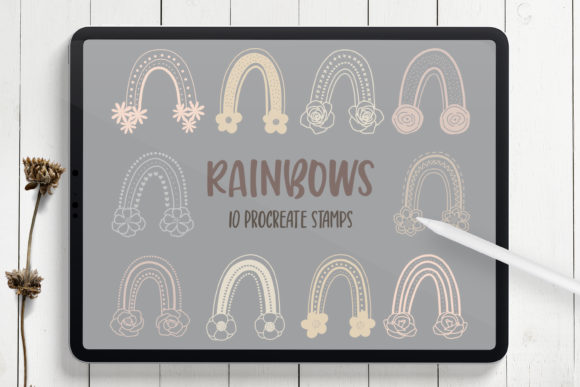
In an era where AI-generated images and stock vectors are ubiquitous, there is a growing demand for authentic, human-touch elements. The Rainbow Procreate Stamp Brushes address this need by offering ten distinct stamp brushes that are digitally hand-drawn. This means each element retains the organic imperfections and warmth of traditional illustration, which can often be lost in purely vector-based or algorithmically generated designs. For designers looking to add a personal, artisanal feel to their work, these stamps provide an immediate solution without the time-consuming process of drawing each element from scratch.
The core advantage of using stamp brushes lies in their versatility. Unlike static images, these brushes allow you to change color, size, and opacity dynamically. This level of control enables you to adapt a single stamp to various contexts within a project. For instance, a rainbow stamp can be resized to serve as a subtle background texture or enlarged to become the focal point of a greeting card. The ability to adjust opacity allows for layering effects, creating depth and visual interest that static clipart cannot achieve.
Practical Applications for Designers and Artists
The utility of the Rainbow Procreate Stamp Brushes extends across a wide range of creative industries. Here are several practical ways to integrate these tools into your workflow:
- Sticker Design: Stickers require bold, recognizable shapes and vibrant colors. These rainbow-themed stamps are ideal for creating cohesive sticker sheets. You can arrange multiple stamps in different sizes and orientations to create a playful, dynamic composition that appeals to both children and adults.
- Invitations and Greeting Cards: Personalized stationery benefits greatly from unique decorative elements. Use the stamps to create decorative borders and frames for wedding invitations, birthday cards, or baby shower announcements. The hand-drawn aesthetic adds a touch of elegance and warmth that resonates with recipients.
- Branding and Logos: For brands aiming for a friendly, approachable, or whimsical identity, these stamps can serve as foundational elements in logo design. By combining different stamps and customizing their colors to match brand guidelines, you can create a unique visual identity that stands out in a crowded market.
- Social Media Design: In the fast-paced world of social media, content needs to be eye-catching and quick to produce. These stamps can be used to embellish Instagram stories, Pinterest pins, or Facebook posts. Create beautiful arrangements and backgrounds that enhance your text overlays without overwhelming the message.
- Digital Artworks and Journaling: Digital planners and art journalers can use these stamps to add decorative flair to their pages. The ability to quickly place and adjust elements allows for experimental layouts and spontaneous creativity.
Workflow Tips for Maximum Efficiency
To get the most out of your Rainbow Procreate Stamp Brushes, consider adopting a structured workflow. Start by organizing your layers. Keep your stamps on separate layers from your background and text elements. This non-destructive approach allows you to move, resize, or delete individual stamps without affecting the rest of your design. Additionally, utilize Procreate’s blending modes to integrate the stamps more naturally into your compositions. For example, using the "Multiply" mode can help stamps blend with textured backgrounds, while "Screen" can create glowing effects.
Color customization is another powerful feature. Do not limit yourself to the default rainbow hues. Experiment with monochromatic schemes for a sophisticated look, or use pastel tones for a softer aesthetic. Since the brushes are hand-drawn, they retain their integrity even when recolored, ensuring that the artistic quality remains high regardless of the palette you choose.
Who Benefits Most from These Brushes?
Different users will approach the Rainbow Procreate Stamp Brushes with varying goals. Professional graphic designers may use them as time-saving assets for client projects, particularly those requiring a handmade aesthetic. Small business owners selling print-on-demand products can leverage these brushes to create unique designs for t-shirts, mugs, and tote bags without needing advanced illustration skills. Hobbyists and students will find them invaluable for learning composition and color theory, as the pre-made shapes allow them to focus on arrangement and balance rather than technical drawing skills.
However, it is important to note that these brushes are not a replacement for fundamental design principles. They are tools to enhance your work, not substitute for creativity. Understanding spacing, hierarchy, and color harmony will still be essential to creating professional-quality designs. The brushes simply remove the barrier of entry for creating complex, hand-drawn elements.
File Format and Delivery
Upon purchase, you will receive a single ZIP file containing one .brushset file. This format is standard for Procreate brush installations. To install, simply tap on the file on your iPad, and it will automatically open in Procreate, adding the new brushes to your library. The simplicity of the delivery ensures that you can start creating immediately without navigating complex installation processes. Remember, the set includes ten hand-drawn stamp brushes, offering a curated selection that covers a variety of decorative needs without overwhelming you with excessive options.
In conclusion, the Rainbow Procreate Stamp Brushes offer a practical, efficient, and aesthetically pleasing solution for iPad artists and designers. By understanding the technical requirements and exploring the diverse applications, you can integrate these tools into your workflow to produce stunning, professional-quality designs. Whether you are decorating invitations, building a brand identity, or simply experimenting with digital art, these hand-drawn stamps provide the flexibility and charm needed to bring your creative vision to life.