Berries Procreate Stamp Brushes: Elevating Your Digital Illustrations
In the rapidly evolving world of digital art, efficiency often dictates the quality and quantity of work a creator can produce. For iPad artists using Procreate, the difference between a project that feels laborious and one that flows naturally often comes down to the tools in their library. This is where specialized resources like Berries Procreate Stamp Brushes become invaluable. These are not just generic shapes; they are digitally hand-drawn assets designed to inject organic charm and professional polish into your creative workflow. Whether you are designing a brand identity for a local bakery or crafting a personal greeting card for a friend, these brushes offer a shortcut to high-quality, textured results without sacrificing artistic integrity.
Understanding the Toolset
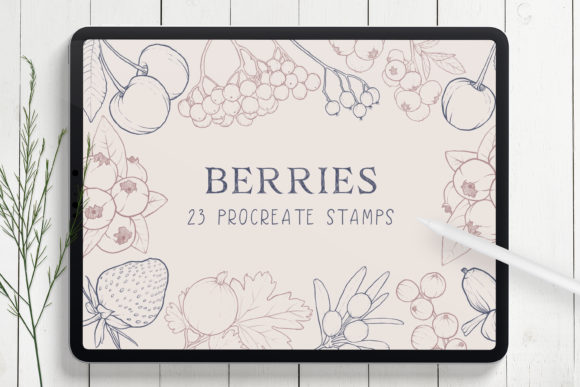
Before diving into applications, it is crucial to understand exactly what this product is and, perhaps more importantly, what it is not. The Berries set includes 23 distinct stamp brushes, comprising 20 unique berry stamps, two leaf variations, and one decorative frame stamp. Each element has been meticulously drawn by hand, ensuring that the textures feel authentic rather than computer-generated. This human touch is vital for creators who want their digital work to retain a warm, approachable aesthetic.
However, technical compatibility is a non-negotiable factor. These brushes are engineered specifically for Procreate 5X on iPad. They rely on the specific brush engine and file structure of this software version. Consequently, they are not suitable for Adobe Photoshop, Illustrator, or any desktop-based illustration software. Furthermore, to utilize the pressure sensitivity and tilt features that make these stamps responsive and dynamic, you will need an Apple Pencil. Trying to use these with a finger or a third-party stylus may result in a lack of precision and control, diminishing the overall experience. Understanding these limitations upfront ensures that you are investing in a tool that fits your existing hardware and software ecosystem.
Real-World Applications for Creators and Entrepreneurs
The versatility of the Berries Procreate Stamp Brushes extends far beyond simple doodling. For small business owners and entrepreneurs, particularly those in the food, wellness, or lifestyle sectors, these assets can serve as foundational elements for branding. Imagine a freelance graphic designer working with a client who runs an organic jam company. Instead of spending hours drawing realistic raspberries and blackberries from scratch, the designer can use these stamps to create a logo or packaging label. By adjusting the color, size, and opacity, the berries can be customized to match the brand’s palette perfectly. This reduces turnaround time significantly while maintaining a bespoke, hand-crafted look that resonates with consumers seeking authenticity.
Social media managers and content creators also benefit immensely from this toolkit. In an era where visual consistency is key to audience engagement, having a library of cohesive decorative elements allows for the rapid creation of story templates, post backgrounds, and highlight covers. A blogger focusing on healthy recipes can use the berry stamps to frame text overlays or create decorative borders for Instagram posts. The ability to layer these stamps—placing leaves behind berries or scattering them across a canvas—adds depth and visual interest that flat vector graphics often lack. This helps content stand out in crowded feeds, offering a tactile quality that draws the eye.
Enhancing Personal Projects and Stationery Design
For hobbyists and makers who sell physical goods, such as stickers, invitations, and greeting cards, these brushes are a game-changer. The process of designing a wedding invitation suite, for example, often requires delicate floral or fruit motifs. Using the Berries Procreate Stamp Brushes, a designer can quickly arrange clusters of berries to create elegant corners or central focal points. The included frame stamp is particularly useful for creating cohesive borders that tie the entire design together. Because the brushes are digital, experimentation is risk-free; you can move, resize, or delete elements instantly until the composition feels balanced.
Consider the scenario of a parent creating custom birthday invitations for their child. With these tools, they can design a "berry-themed" party invite that looks professionally printed but was created at home. The intuitive nature of Procreate allows users to change the opacity of the stamps to create watercolor-like effects, giving the final print a soft, artistic vibe. This democratization of design tools empowers everyday users to produce high-quality materials for personal milestones without needing advanced illustration skills.
Technical Flexibility and Creative Control
One of the strongest features of this brush set is its adaptability. While they are pre-drawn stamps, they are not rigid. Users have full control over the color, size, and opacity of each stamp. This means a single blueberry stamp can be transformed into a shadowy background element by lowering its opacity and increasing its size, or it can be used as a sharp, vibrant focal point by keeping it small and opaque. This flexibility allows for the creation of complex arrangements and backgrounds that feel layered and dynamic.
For educators and students in digital art courses, these brushes serve as excellent teaching aids for understanding composition and color theory. Instructors can demonstrate how repeating patterns affect visual rhythm or how contrasting colors enhance focal points using these consistent, high-quality assets. Students can focus on the principles of design rather than getting bogged down in the technical difficulties of drawing complex organic shapes from scratch.
What to Consider Before Downloading
While the benefits are clear, potential users should evaluate their needs before purchasing. First, assess your current workflow. If you primarily work in vector-based programs like Illustrator for scalable logos, these raster-based Procreate brushes may not integrate seamlessly into your primary pipeline. They are best suited for projects that will be exported as PNGs or JPEGs for digital use or printed at specific resolutions.
Second, consider your device setup. As noted, the requirement for an iPad with Procreate 5X and an Apple Pencil is strict. If you are using an older version of Procreate or a different tablet, these brushes will not function as intended. It is also worth noting that this is a niche product focused on botanical elements. If your work rarely involves nature-inspired themes, the utility of the set may be limited. However, for those who frequently incorporate organic textures into their work, the time saved and the quality gained are substantial.
Finally, think about the format. You will receive one BRUSHSET file contained within a ZIP file. This means you need to be comfortable with basic file management on your iPad, such as importing files from the Files app into Procreate. For most modern iPad users, this is a straightforward process, but it is a step that cannot be automated.
Conclusion
The Berries Procreate Stamp Brushes represent a practical solution for a wide range of digital creators. From streamlining commercial branding projects to adding a personal touch to handmade stationery, these hand-drawn assets bridge the gap between professional quality and user-friendly efficiency. By understanding the technical requirements and exploring the diverse ways these stamps can be manipulated, users can unlock new levels of creativity in their digital art journey. Whether you are a seasoned freelancer or a passionate hobbyist, integrating these tools into your library can simplify your workflow and elevate the visual appeal of your projects.