Mastering Digital Art with Brush Strokes Set and Black Ink Brushes
In the evolving landscape of digital design, the tactile feel of traditional media remains a highly sought-after aesthetic. Whether you are a graphic designer, an illustrator, or a hobbyist creator, achieving that authentic, hand-drawn look can often feel like a significant hurdle. This is where a comprehensive Brush Strokes Set featuring Black Ink Brushes becomes an invaluable asset. These tools bridge the gap between analog artistry and digital precision, offering creators a versatile library to enhance their workflows in software like Adobe Illustrator, Photoshop, and beyond.
The Essence of Authentic Digital Inking
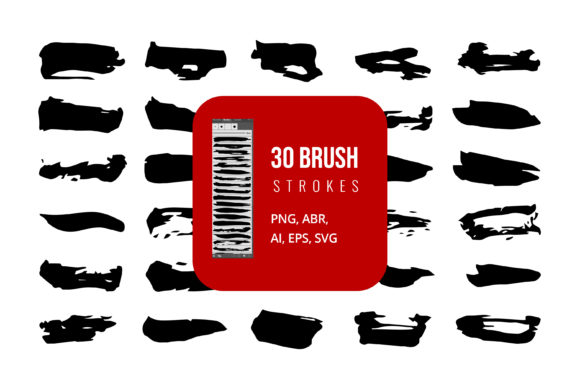
The core appeal of a high-quality Brush Strokes Set lies in its ability to replicate the imperfections and organic flow of real ink on paper. Unlike standard digital vectors that can appear sterile or overly uniform, black ink brushes introduce texture, variance, and character. When you utilize these assets, you are not just placing a shape; you are injecting personality into your design. The Black Ink Brushes included in such sets are typically designed to mimic the behavior of nib pens, calligraphy brushes, and dry brush techniques, providing a rich visual depth that flat colors simply cannot achieve.
For professionals, this means faster turnaround times without sacrificing quality. Instead of spending hours manually drawing every stroke or tweaking vector points to look "natural," you can deploy pre-made, high-resolution brush strokes that integrate seamlessly into your composition. This efficiency is crucial for business owners and agencies working under tight deadlines, allowing them to maintain a premium, hand-crafted aesthetic while optimizing production schedules.
Versatility Across File Formats: AI, SVG, EPS, and More
One of the most critical considerations when selecting digital assets is compatibility. A robust brush set should not limit you to a single application. The ideal package provides files in multiple formats, ensuring you can edit and use them across various platforms. Here is how different file types empower your creative process:
- AI (Adobe Illustrator): Perfect for vector-based editing. You can scale these brushes infinitely without losing quality, making them ideal for logos, large-format prints, and scalable graphics.
- SVG (Scalable Vector Graphics): A web-friendly format that retains vector properties. This is essential for web designers who need crisp, lightweight graphics for websites and apps.
- EPS (Encapsulated PostScript): A universal vector format compatible with many design programs, including older versions of software and even Microsoft Word or PowerPoint for high-quality document design.
- JPG and PNG: Raster formats that are ready to use immediately. PNGs with transparent backgrounds are particularly useful for quick compositing in photo editing software or social media graphics.
- ABR (Adobe Brush): Specifically formatted for Adobe Photoshop. These allow you to paint with the brush dynamically, offering control over pressure, opacity, and flow, simulating the actual experience of drawing.
By having access to AI, SVG, EPS, JPG, PNG, and ABR files, you ensure that your Brush Strokes Set is future-proof. Whether you are designing a business card in Microsoft Word using an EPS insert or creating a complex digital painting in Photoshop with ABR brushes, the flexibility to switch formats eliminates technical bottlenecks.
Integrating with Adobe Creative Cloud and Beyond
The synergy between these brush sets and Adobe software is profound. In Adobe Illustrator, you can import the AI or EPS files to create custom pattern brushes. This allows you to draw a path and have the black ink stroke follow it automatically, maintaining consistent texture along curves and corners. This feature is a game-changer for creating borders, frames, and typographic embellishments.
In Adobe Photoshop, the ABR files unlock dynamic capabilities. You can adjust the size and opacity of the Black Ink Brushes in real-time using a graphics tablet. This level of control is vital for illustrators who need to vary line weight to convey depth and movement. Furthermore, because these brushes are high-resolution, they hold up well even when printed at large sizes, ensuring that your digital work translates beautifully to physical media.
However, the utility extends beyond Adobe. If you are a content creator using Microsoft PowerPoint or Word, the inclusion of JPG and PNG files allows you to drag and drop stylish ink elements into presentations and documents. This adds a professional, bespoke touch to corporate reports or marketing materials without requiring advanced design skills. The EPS format also serves as a bridge for users of other vector software like CorelDRAW or Affinity Designer, ensuring broad accessibility.
Real-World Applications and Use Cases
Understanding the technical specifications is important, but seeing how these tools apply to real-world scenarios highlights their true value. Here are several practical applications for a Brush Strokes Set:
- Branding and Identity: Many modern brands seek a human, approachable feel. Using black ink brushes for logo accents or packaging design can convey artisanal quality and authenticity. For example, a coffee shop brand might use rough ink strokes to suggest hand-roasted beans and traditional brewing methods.
- Social Media Content: In the fast-paced world of Instagram and TikTok, standing out is key. Overlaying ink splatters or brush strokes on photos can create eye-catching thumbnails and posts. The PNG format makes this quick and easy, allowing non-designers to add flair to their content.
- Web Design and UI: Subtle ink textures can break up the monotony of flat web design. SVG files are perfect here, as they load quickly and remain sharp on retina displays. They can be used as section dividers, background elements, or interactive hover states.
- Print Media and Editorial: Magazines and newspapers often use ink illustrations to accompany articles. The high-resolution nature of EPS and AI files ensures that these graphics print crisply, adding sophistication to layouts.
- Educational Materials: Teachers and instructional designers can use these brushes to highlight key information in worksheets or online courses. The hand-drawn look can make educational content feel more engaging and less rigid.
Evaluating Suitability: What to Look For
Not all brush sets are created equal. When evaluating a Brush Strokes Set, consider the following factors to ensure it meets your needs:
Resolution and Scalability: Ensure that the vector files (AI, SVG, EPS) are clean and free of unnecessary anchor points. For raster files (JPG, PNG), check that the resolution is at least 300 DPI for print purposes. Low-resolution assets will appear pixelated and unprofessional.
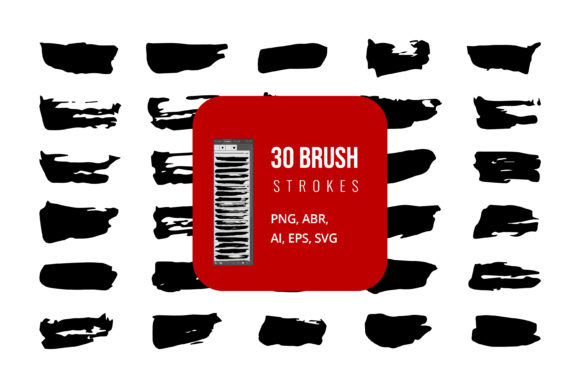
Variety of Strokes: A good set should offer diversity. Look for variations in thickness, texture, and direction. You want dry brushes, wet ink pools, sharp lines, and soft edges. This variety allows you to build complex compositions without repetitive patterns.
Ease of Editing: The files should be easy to modify. In Illustrator, can you easily change the color of the stroke? In Photoshop, does the ABR brush respond well to pressure sensitivity? Testing these aspects ensures the tool fits your workflow rather than complicating it.
Licensing and Usage Rights: Always check the license agreement. Most professional sets allow for commercial use, which is essential for business owners and freelancers. Ensure you understand any restrictions regarding redistribution or modification.
Conclusion: Elevating Your Creative Toolkit
Incorporating a Brush Strokes Set with Black Ink Brushes into your digital toolkit is more than just acquiring new assets; it is an investment in the quality and versatility of your creative output. By providing files in AI, SVG, EPS, JPG, PNG, and ABR formats, these sets empower you to work across multiple platforms, from Adobe Illustrator and Photoshop to Microsoft Word and PowerPoint.
Whether you are a seasoned professional looking to streamline your workflow or a beginner eager to add a touch of elegance to your projects, these tools offer a practical solution. They save time, enhance visual appeal, and provide the flexibility needed in today’s multi-platform digital environment. As you explore the possibilities, remember that the best tools are those that disappear into the workflow, allowing your creativity to take center stage. With the right brush set, you can achieve that perfect balance of digital efficiency and artistic soul.