Enhancing Digital Art with Ribbon Procreate Stamp Brushes
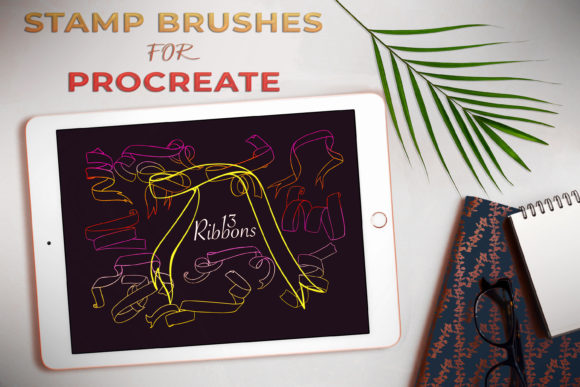
Digital illustration has evolved far beyond simple sketches and flat colors. Today, artists are constantly seeking tools that bridge the gap between traditional tactile media and the efficiency of digital workflows. One such tool that has gained significant traction among designers and illustrators is the Ribbon Procreate Stamp Brushes set. This collection, featuring 13 distinct hand-drawn ribbon shapes, offers a unique solution for adding decorative flair to digital compositions without the tedious process of drawing each fold and shadow manually.
For many creatives, ribbons represent a classic design element that conveys elegance, celebration, and structure. However, rendering realistic fabric folds, highlights, and shadows can be time-consuming. These stamp brushes streamline that process, allowing users to place intricate ribbon designs instantly. Whether you are working on a quick social media graphic or a detailed wedding invitation suite, understanding how to leverage these tools can significantly enhance your productivity and artistic output.
The Practical Appeal of Hand-Drawn Ribbons
The core value of this brush set lies in its authenticity. Unlike vector-based clip art that can sometimes feel sterile or overly perfect, these brushes are crafted from hand-drawn originals. This means each stamp retains the organic imperfections and texture of traditional ink or pencil work. For artists aiming to create a warm, inviting, or vintage aesthetic, this texture is invaluable.
When you use Ribbon Procreate Stamp Brushes, you are not just placing a shape; you are adding a layer of artistic intent. The variations in line weight and the subtle irregularities in the curves mimic the natural flow of fabric. This makes them particularly effective for projects that require a human touch, such as personalized stationery, journaling layouts, or branding materials for boutique businesses. The ability to rotate, resize, and recolor these stamps within Procreate gives you full control over how they integrate into your broader composition.
Ideal Use Cases for Designers and Illustrators
The versatility of these 13 ribbon shapes means they fit seamlessly into various creative industries. Here is how different professionals can benefit from incorporating them into their workflow:
- Wedding and Event Stationery: This is perhaps the most obvious application. Wedding invitations, save-the-dates, and menu cards often feature elaborate typography framed by decorative elements. Ribbons serve as excellent framing devices for names, dates, or quotes. Using stamp brushes allows designers to experiment with layout quickly, trying different ribbon positions without redrawing complex geometry.
- Lettering and Calligraphy Art: Lettering artists frequently look for ways to anchor their text. A ribbon banner behind a main headline provides visual weight and draws the eye. The Ribbon Procreate Stamp Brushes pair exceptionally well with script fonts, creating a cohesive vintage or romantic vibe. You can place the ribbon first, then write over it, or place it behind finished lettering for a layered effect.
- Greeting Cards and Postcards: For independent sellers on platforms like Etsy, speed is essential. Being able to drag and drop a pre-made ribbon element reduces the time spent on each card design. This efficiency allows creators to produce larger collections of seasonal or thematic cards, such as birthday, anniversary, or holiday greetings.
- Scrapbooking and Digital Journaling: The rise of digital planning has created a demand for decorative stickers and elements. These ribbon stamps act as digital washi tape or decorative borders, helping users organize sections in their digital planners or add flair to their GoodNotes journals.
Synergy with Other Creative Tools
One of the most compelling aspects of this brush set is how well it complements other digital assets. The description notes that this set is a perfect pair for Plant Brushes for Procreate. This combination opens up a world of botanical design possibilities. Imagine a floral wreath where the stems are intertwined with delicate ribbons. The organic lines of the plant brushes harmonize with the hand-drawn nature of the ribbons, creating a unified aesthetic that feels curated rather than assembled from disparate parts.
When combining ribbons with botanical elements, consider the hierarchy of your design. Use the ribbons to highlight specific flowers or to create a central focal point for text. The contrast between the structured form of the ribbon and the free-flowing nature of leaves and petals adds visual interest and depth to your artwork. This synergy is particularly useful for branding packages for florists, spas, or organic product lines, where a natural yet polished look is desired.
Technical Considerations and Best Practices
While stamp brushes offer convenience, using them effectively requires an understanding of digital layer management and color theory. Here are some practical considerations to keep in mind:
Color Customization: Although the stamps come with predefined colors, their true power lies in customization. Use the hue, saturation, and brightness sliders in Procreate to match the ribbons to your specific palette. Remember that ribbons are fabric; they should reflect the ambient light of your scene. Adding subtle gradients or using clipping masks to add shadows can make the flat stamps appear more three-dimensional.
Layering and Depth: To avoid a "sticker-like" appearance, think about where the ribbon sits in space. Does it go behind the text? Does it weave in and out of other elements? Use multiple layers to separate the front and back parts of the ribbon if necessary. This technique is crucial for creating the illusion that the ribbon is wrapping around an object, such as a gift box or a flower stem.
Resolution and Scaling: Since these are raster-based brushes, scaling them up too much can result in pixelation. Always test the size limits of the stamps before committing to a final design. If you need a very large ribbon, consider using the highest resolution settings available in Procreate or breaking the design into smaller, overlapping segments.
Potential Limitations and How to Overcome Them
No tool is without its limitations. Because these are pre-designed shapes, you may find that none of the 13 options fit your exact spatial requirements. In such cases, do not hesitate to modify the stamps. Use the liquefy tool to gently warp the ribbon to fit a specific curve, or erase parts of the stamp to create a custom shape. The goal is to use the stamp as a foundation, not a rigid constraint.
Additionally, overuse can lead to repetitive designs. If you are creating a series of products, vary which ribbon shape you use and alter their colors and orientations. Combining different ribbons or pairing them with other decorative elements like dots, stars, or leaves can help maintain freshness in your work.
Final Thoughts on Integrating Ribbons into Your Workflow
The Ribbon Procreate Stamp Brushes represent more than just a shortcut; they are a creative catalyst. By removing the technical barrier of drawing complex fabric folds, they allow artists to focus on composition, color, and storytelling. Whether you are a seasoned graphic designer looking to speed up your client work or a hobbyist exploring digital lettering, these tools offer a practical way to elevate your designs.
Embracing these brushes means embracing a hybrid approach to digital art—combining the efficiency of technology with the warmth of hand-drawn aesthetics. As you experiment with these 13 shapes, you will likely discover new ways to integrate them into your unique style, transforming simple digital canvases into elegant, professional-grade artworks.