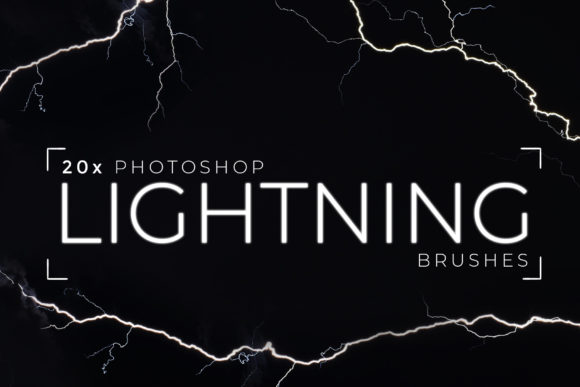
20x Photoshop Lightning Brushes: Adding Realistic Electric Effects to Your Designs
There is a specific kind of frustration that comes with trying to paint lightning in Adobe Photoshop from scratch. You spend hours adjusting brush dynamics, tweaking opacity settings, and drawing jagged lines that never quite look right. The result often feels stiff, artificial, or like something out of a cartoon rather than a high-end digital composition. This is where having the right tools changes everything. Instead of fighting with the software to mimic nature’s most chaotic energy source, you can leverage resources that have already done the heavy lifting for you. The 20x Photoshop Lightning Brushes pack offers a streamlined solution for creators who need photorealistic electric effects without the steep learning curve.
This collection isn’t just a set of random shapes; it is a curated toolkit designed to integrate seamlessly into your existing workflow. Whether you are a freelance graphic designer working on a movie poster, a social media manager creating eye-catching thumbnails, or a hobbyist editing photos for fun, these brushes provide an instant upgrade to your visual output. By using assets created from real photographs of lightning, you bypass the guesswork and achieve results that look authentic and grounded in reality.
Why Realism Matters in Digital Art
In the world of digital design, viewers are surprisingly good at spotting what looks "off." When an element doesn’t match the lighting, texture, or physics of the rest of the image, it breaks immersion. Lightning is particularly difficult because it is transient, incredibly bright, and complex in structure. A simple white line rarely convinces the eye. It needs branches, varying intensity, and a glow that interacts with the surrounding environment.
The 20x Photoshop Lightning Brushes address this by utilizing source material from actual lightning strikes. This means the branching patterns, the fade-out at the edges, and the core intensity are based on real-world data. For professional marketers and entrepreneurs, this level of detail translates to higher perceived value. When you are selling a product or promoting an event, sloppy graphics can undermine your credibility. High-quality, realistic effects signal professionalism and attention to detail, helping your brand stand out in a crowded digital landscape.
Practical Use Cases for Creators and Businesses
Understanding when and where to use these brushes is key to getting the most out of them. Here are several realistic scenarios where this toolset becomes invaluable:
Social Media and Content Marketing
In the fast-paced world of Instagram, TikTok, and YouTube, grabbing attention within the first three seconds is crucial. Electric effects are a proven way to highlight text, frame products, or add energy to static images. Imagine you are promoting a new tech gadget or an energetic fitness program. Using one of the 20 detailed brushes to create a subtle electric arc around your subject can draw the viewer’s eye immediately. Because these brushes are easy to use, you can produce multiple variations quickly, allowing you to A/B test different designs without spending hours on each iteration.
Music and Event Promotion
DJs, music producers, and event organizers often need visuals that convey power, energy, and excitement. Flyer designs for electronic dance music (EDM) events, rock concerts, or nightclub parties frequently feature lightning motifs. With this pack, you can layer multiple brushes to create complex stormy backgrounds or sharp, striking bolts that cut through the darkness. The included 2x Bonus Brushes can add extra texture or atmospheric depth, giving your posters a unique look that doesn’t rely on overused stock templates.
Photo Manipulation and Surreal Art
For digital artists and photo manipulators, lightning is a staple element in fantasy and sci-fi compositions. Whether you are creating a superhero scene, a magical battle, or a dystopian cityscape, realistic lightning adds drama and scale. The advantage of using brushes based on real photos is that they blend more naturally with photographic elements. You can adjust the blending modes—such as Screen or Linear Dodge—to make the light interact convincingly with clouds, buildings, or characters. This saves time on masking and color grading, allowing you to focus on the creative narrative of your piece.
Educational and Editorial Illustrations
Educators and publishers creating materials about weather, physics, or natural phenomena can also benefit from these tools. Instead of using generic clip art, you can insert accurate representations of lightning strikes into diagrams or textbook illustrations. This helps students visualize concepts more clearly. Similarly, editorial designers working on magazine articles about storms or climate change can use these brushes to create compelling header images that are both informative and visually striking.
What to Consider Before You Start
While the 20x Photoshop Lightning Brushes are designed for ease of use, there are a few practical considerations to keep in mind to ensure the best results. First, remember that lighting effects depend heavily on context. A lightning bolt looks different against a dark night sky than it does against a cloudy afternoon backdrop. You will need to adjust the color, opacity, and size of the brush to match your specific image. The PDF Instruction Manual included in the pack is a valuable resource here, offering guidance on how to tweak settings for different environments.
Second, consider the resolution of your project. If you are designing for large-format prints, such as billboards or banners, ensure you are working at a high enough DPI so that the brush strokes remain crisp. For web-based content, standard resolutions usually suffice, but always preview your work on different devices to check for clarity.
Finally, think about subtlety. More is not always better. Sometimes, a single, well-placed spark is more effective than a chaotic storm of electric arcs. Use these brushes to enhance your composition, not overwhelm it. Experiment with layering different brushes from the set to create depth, but maintain a cohesive look that serves your overall design goal.
Getting the Most Out of the Pack
To truly master these tools, start by exploring the variety within the 20 main brushes. Each one has a unique character—some are thin and jagged, others are broad and diffuse. Try applying them on separate layers so you can adjust their individual properties without affecting the rest of your design. Use the bonus brushes to add ambient glow or secondary sparks that make the primary lightning feel more integrated into the scene.
If you encounter any issues or have questions about installation and usage, the creator encourages you to get in touch. This support can be invaluable, especially if you are new to custom brush installation in Photoshop. Taking the time to read the manual and experiment with the settings will pay off in the quality of your final outputs.
Ultimately, the 20x Photoshop Lightning Brushes are about efficiency and quality. They allow you to achieve professional-grade results in a fraction of the time it would take to create these effects manually. For busy freelancers, small business owners, and creative enthusiasts, this means more time to focus on strategy, storytelling, and other aspects of your projects. By adding this tool to your arsenal, you equip yourself to handle a wide range of design challenges with confidence and creativity.